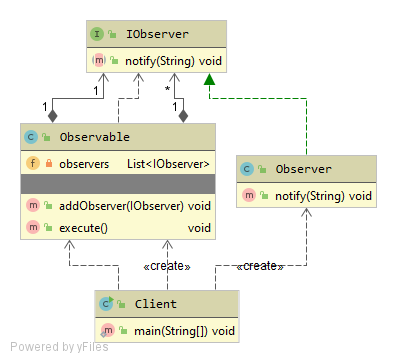
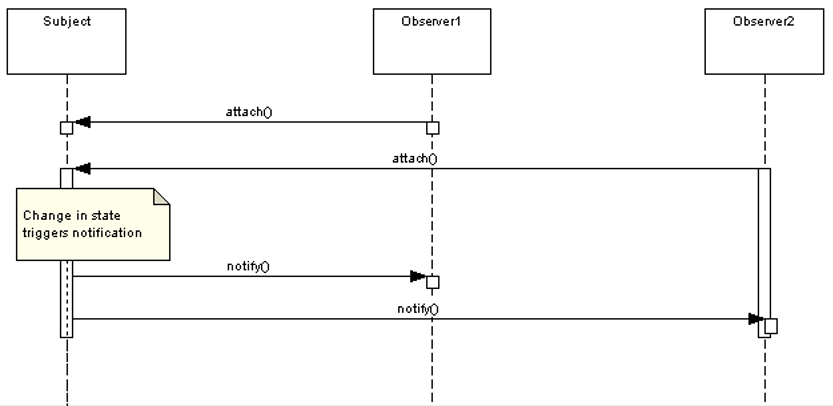
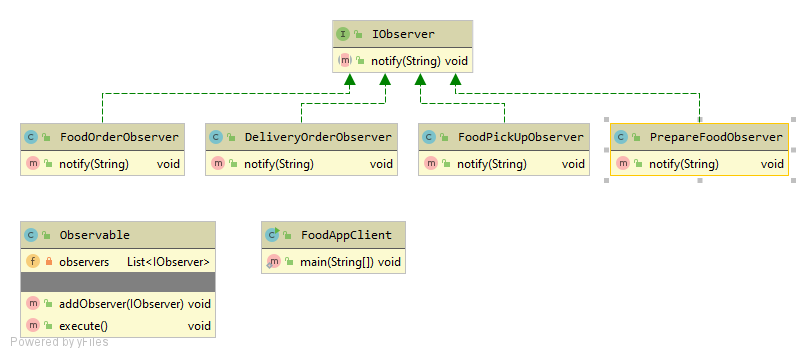
https://medium.com/building-the-open-data-stack/observer-versus-pub-sub-design-patterns-48b1dbc83916
Queries
How to Delete duplicate Rows from Table
In the below table studId 1,6 and 9 is repeated which should be deleted.
| studId | studentName | age |
|---|---|---|
| 1 | Mugil | 35 |
| 2 | Vinu | 36 |
| 3 | Viju | 42 |
| 4 | Mani | 35 |
| 5 | Madhu | 36 |
| 6 | Mugil | 35 |
| 7 | Venu | 37 |
| 8 | Banu | 34 |
| 9 | Mugil | 35 |
Below query wont work on MySQL but the format doesn’t change. When you take Max only last occurrence of row would be taken and others would be excluded.
DELETE FROM tblStudents TS
WHERE TS.studId NOT IN (SELECT MAX(TSS.studId)
FROM tblStudents TSS
GROUP BY TSS.studentName, TSS.age)c
The same could be done using MIN function.
SELECT TS.* FROM tblStudents TS
WHERE TS.studId NOT IN (SELECT MIN(TSS.studId)
FROM tblStudents TSS
GROUP BY TSS.studentName, TSS.age)
Output
| studId | studentName | age |
|---|---|---|
| 6 | Mugil | 35 |
| 9 | Mugil | 35 |
Basic Threads Implementation
- Thread Constructor(new Thread()) takes runnable as argument but not callable
- Thread instance can use either start() or run() methods to start execution of thread. start() method spawns new thread other than main to complete execution whereas run method uses the main thread to carry out execution.
- Managing Thread lifecycle is difficult hence ExecutionService framework was introduced
- When you run thread using ExecutionService it takes either instance of Ruunal
Thread Implementation Using Traditional Threads- Old Way
Task.java
public class Task implements Runnable{
@Override
public void run() {
System.out.println("Hello from Task.class, executed by " + currentThread().getName() + " thread");
}
}
Main.java
public class Main {
public static void main(String[] args) {
Thread thread = new Thread(new Task());
thread.run();
}
}
Output
Hello from Task.class, executed by main thread
Thread Implementation Using ExecutionService – New Way
ExecutorService is an interface in Java that provides a higher-level replacement for using raw threads. It manages a pool of threads to handle asynchronous tasks more efficiently, without the need to manually create or manage individual threads.
Simple Program using Executor Service taking Runnable as Argument
ExecutorService is a framework which allows to create thread. Threads can be created from FixedThreadPool, CachedThreadPool and ScheduledThreadPool. submit() method takes runnable or callable object (Functional Interface Type) as argument.
Main.java
import java.util.concurrent.ExecutorService;
import java.util.concurrent.Executors;
public class Main {
public static void main(String[] args) {
ExecutorService executorService = Executors.newFixedThreadPool(3);
executorService.submit(new Task());
}
}
Output
Hello from Task.class, executed by pool-1-thread-1 thread
Why we need ExecutorService when we can directly call Thread using run() or start() method?
Problem with using old Thread Methods
Poor Resource Management i.e. It keep on creating new resource for every request. No limit to creating resource. Using Executor framework we can reuse the existing resources and put limit on creating resources.
Not Robust : If we keep on creating new thread we will get StackOverflowException exception consequently our JVM will crash.
Overhead Creation of time : For each request we need to create new resource. To creating new resource is time consuming. i.e. Thread Creating > task. Using Executor framework we can get built in Thread Pool.
- Use of Thread Pool reduces response time by avoiding thread creation during request or task processing.
- Use of Thread Pool allows you to change your execution policy as you need. you can go from single thread to multiple thread by just replacing ExecutorService implementation.
- Thread Pool in Java application increases stability of system by creating a configured number of threads decided based on system load and available resource.
- Thread Pool frees application developer from thread management stuff and allows to focus on business logic.
Runnable vs Callable
Using Runnable doesn’t returns any value whereas callable returns value to the main thread
HelloThread1.java
public class TaskRunnable implements Runnable{
@Override
public void run() {
System.out.println("Hello from "+ this.getClass().getSimpleName() + ", executed by " + currentThread().getName() + " thread");
}
}
HelloThread2.java
public class TaskCallable implements Callable {
@Override
public String call() throws Exception {
System.out.println("Hello from "+ this.getClass().getSimpleName() + ", executed by " + currentThread().getName() + " thread");
return "Hello from Callable";
}
}
Main.java
public class Main {
public static void main(String[] args) throws Exception {
TaskRunnable objTaskRunnable = new TaskRunnable(); //Instance of Runnable
TaskCallable objTaskCallable = new TaskCallable(); //Instance of Callable
String strText = objTaskCallable.call();
System.out.println(strText); //I am a Blocking Operation
objTaskRunnable.run();
}
}
Output
Hello from TaskCallable, executed by main thread Hello from Callable Hello from TaskRunnable, executed by main thread
Now the same code can be executed using ExecutionService Framework by taking thread from thread pool as below
Main.java
public class Main {
public static void main(String[] args) throws Exception {
ExecutorService executorService = Executors.newFixedThreadPool(3); // Pool of 3 threads// Submit tasks to the executor
TaskCallable objTaskCallable = new TaskCallable();
TaskRunnable objTaskRunnable = new TaskRunnable();
Future<String> strText = executorService.submit(objTaskCallable);
System.out.println(strText.get()); //I am a Blocking Operation
executorService.submit(objTaskRunnable);
executorService.shutdown();
}
}
Output
Hello from TaskCallable, executed by pool-1-thread-1 thread Hello from Callable Hello from TaskRunnable, executed by pool-1-thread-2 thread
Threads and States
- NEW – a newly created thread that has not yet started the execution
- RUNNABLE – either running or ready for execution but it’s waiting for resource allocation
- BLOCKED – waiting to acquire a monitor lock to enter or re-enter a synchronized block/method
- WAITING – waiting for some other thread to perform a particular action without any time limit
- TIMED_WAITING – waiting for some other thread to perform a specific action for a specified period
- TERMINATED – has completed its execution
NEW Thread (or a Born Thread) is a thread that’s been created but not yet started.
It remains in this state until we start it using the start() method
NewState.java
public class NewState implements Runnable{
public void run(){
System.out.println("I am in new State");
}
}
Main.java
public class Main {
public static void main(String[] args) throws InterruptedException {
Thread objThread = new Thread(new NewState());
System.out.println(objThread.getState());
}
}
Output
NEW
Runnable When we’ve created a new thread and called the start() method on that, it’s moved from NEW to RUNNABLE state. Threads in this state are either running or ready to run, but
they’re waiting for resource allocation from the system. In a multi-threaded environment, the Thread-Scheduler (which is part of JVM) allocates a fixed amount of time to each thread. So it runs for a particular amount of time, then leaves the control to other RUNNABLE threads.
RunnableState .java
public class RunnableState implements Runnable{
public void run(){
System.out.println("I would be in Runnable State");
}
}
Main.java
public class Main {
public static void main(String[] args) throws InterruptedException {
Thread objRThread = new Thread(new RunnableState());
objRThread.start();
System.out.println(objRThread.getState());
}
}
Output
RUNNABLE I would be in Runnable State
This is the state of a dead thread. It’s in the TERMINATED state when it has either finished execution or was terminated abnormally.
TerminatedState.java
public class TerminatedState implements Runnable{
public void run(){
Thread objNewState = new Thread(new NewState());
objNewState.start();
}
}
Main.java
public class Main {
public static void main(String[] args) throws InterruptedException {
Thread objTState = new Thread(new TerminatedState());
objTState.start();
objTState.sleep(1000);
System.out.println("T1 : "+ objTState.getState());
}
}
Output
I am in new State T1 : TERMINATED
A thread is in the BLOCKED state when it’s currently not eligible to run. It enters this state when it is waiting for a monitor lock and is trying to access a section of code that is locked by some other thread.
BlockedState.java
public class BlockedState implements Runnable{
public void run(){
blockedResource();
}
public static synchronized void blockedResource(){
while(true){
//Do Nothing
}
}
}
Main.java
public class Main {
public static void main(String[] args) throws InterruptedException {
Thread objB1Thread = new Thread(new BlockedState());
Thread objB2Thread = new Thread(new BlockedState());
objB1Thread.start();
objB2Thread.start();
Thread.sleep(1000);
System.out.println(objB1Thread.getState());
System.out.println(objB2Thread.getState());
System.exit(0);
}
}
Output
RUNNABLE BLOCKED
A thread is in WAITING state when it’s waiting for some other thread to perform a particular action. According to JavaDocs, any thread can enter this state by calling any one of the following
object.wait() (or) thread.join() (or) LockSupport.park()
WaitingState.java
public class WaitingState implements Runnable{
public void run(){
Thread objWaitState = new Thread(new SleepState());
objWaitState.start();
try {
objWaitState.join();
} catch (InterruptedException e) {
throw new RuntimeException(e);
}
}
}
SleepState.java
public class SleepState implements Runnable{
@Override
public void run() {
try {
Thread.sleep(5000);
} catch (InterruptedException e) {
throw new RuntimeException(e);
}
}
}
Main.java
public class Main {
public static void main(String[] args) throws InterruptedException {
Thread objWaitingThread = new Thread(new WaitingState());
objWaitingThread.start();
objWaitingThread.sleep(1000);
System.out.println("T1 : "+ objWaitingThread.getState());
System.out.println("Main : "+Thread.currentThread().getState());
}
}
Output
T1 : WAITING Main : RUNNABLE
A thread is in TIMED_WAITING state when it’s waiting for another thread to perform a particular action within a stipulated amount of time. According to JavaDocs, there are five ways to put a thread on TIMED_WAITING state:
thread.sleep(long millis) (or) wait(int timeout) (or) wait(int timeout, int nanos) thread.join(long millis) (or) LockSupport.parkNanos (or) LockSupport.parkUntil
TimedWaitState.java
public class TimedWaitState implements Runnable{
@Override
public void run() {
try {
Thread.sleep(5000);
} catch (InterruptedException e) {
throw new RuntimeException(e);
}
}
}
Main.java
public class Main {
public static void main(String[] args) throws InterruptedException {
Thread objTWState = new Thread(new TimedWaitState());
objTWState.start();
Thread.sleep(2000);
System.out.println("T1 : "+ objTWState.getState());
}
}
Output
T1 : TIMED_WAITING
Simple Ticket Reservation System
- We use ReentrantLock for locking the Resource(totalSeats)
- Incase anything goes wrong (Exception being thrown etc.) you want to make sure the lock is released no matter what.
- Calling the reserveSeats method should be done inside separate threads
ReservationSystem.java
import java.util.concurrent.locks.Lock;
import java.util.concurrent.locks.ReentrantLock;
public class ReservationSystem {
private Integer totalSeats;
private final Lock lock = new ReentrantLock();
public ReservationSystem(Integer totalSeats){
this.totalSeats = totalSeats;
}
public Integer getTotalSeats(){
return totalSeats;
}
public void reserveSeats(String userName, int numOfSeats){
lock.lock();
try{
if(numOfSeats >0 && totalSeats>numOfSeats){
totalSeats -= numOfSeats;
System.out.println(userName + " has reserved "+ numOfSeats + " with " + totalSeats + " still available");
}else{
System.out.println("Seats not Available");
}
}finally {
lock.unlock();
}
}
}
BookSeat.java
public class BookSeat {
public static void main(String[] args) {
ReservationSystem objResSys = new ReservationSystem(100);
System.out.println("Total available Seats "+ objResSys.getTotalSeats());
Thread objThread1 = new Thread(() -> {objResSys.reserveSeats("User1", 10);});
Thread objThread2 = new Thread(() -> {objResSys.reserveSeats("User2", 20);});
Thread objThread3 = new Thread(() -> {objResSys.reserveSeats("User3", 5);});
objThread1.start();
objThread2.start();
objThread3.start();
try {
objThread1.join();
objThread2.join();
objThread3.join();
} catch (InterruptedException e) {
Thread.currentThread().interrupt();
}
System.out.println("Remaining available Seats "+ objResSys.getTotalSeats());
}
}
Total available Seats 100 User2 has reserved 20 with 80 still available User1 has reserved 10 with 70 still available User3 has reserved 5 with 65 still available Remaining available Seats 65
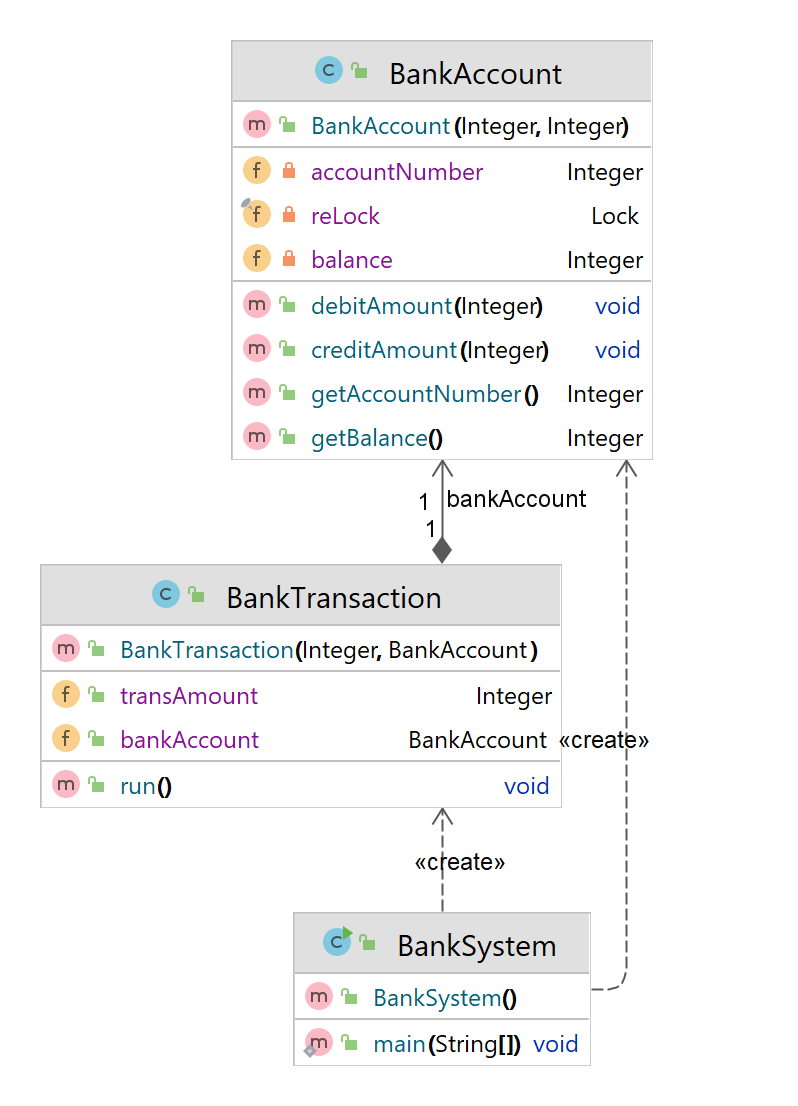
Simple Banking System handling Transactions with Threads
Banking System
- We have Bank Account with 2 Fields – balance and Account Number
- We have Transaction class implementing Runnable
- We create object for account with some initial balance and try to pass as parameter to runnable Transaction Object

BankAccount.java
import java.util.concurrent.locks.Lock;
import java.util.concurrent.locks.ReentrantLock;
public class BankAccount {
private Integer balance;
private Integer accountNumber;
private final Lock reLock = new ReentrantLock();
public BankAccount(Integer balance, Integer accountNumber){
this.balance = balance;
this.accountNumber = accountNumber;
}
public void debitAmount(Integer amount){
reLock.lock();
try{
balance -= amount;
}finally {
reLock.unlock();
}
}
public void creditAmount(Integer amount){
reLock.lock();
try{
balance += amount;
}finally {
reLock.unlock();
}
}
public Integer getAccountNumber(){
return this.accountNumber;
}
public Integer getBalance(){
return this.balance;
}
}
BankTransaction.java
public class BankTransaction implements Runnable{
public Integer transAmount;
public BankAccount bankAccount;
public BankTransaction(Integer transAmount, BankAccount bankAccount){
this.transAmount = transAmount;
this.bankAccount = bankAccount;
}
@Override
public void run() {
if(transAmount >= 0){
bankAccount.creditAmount(transAmount);
}else{
bankAccount.debitAmount(Math.abs(transAmount));
}
}
}
BankSystem.java
public class BankSystem {
public static void main(String[] args) {
BankAccount objAcc1 = new BankAccount(1000, 101);
BankAccount objAcc2 = new BankAccount(2000, 102);
Thread objThread1 = new Thread(new BankTransaction(50, objAcc1));
Thread objThread2 = new Thread(new BankTransaction(-150, objAcc2));
Thread objThread3 = new Thread(new BankTransaction(250, objAcc2));
Thread objThread4 = new Thread(new BankTransaction(250, objAcc1));
objThread1.start();
objThread2.start();
objThread3.start();
objThread4.start();
try{
objThread1.join();
objThread2.join();
objThread3.join();
objThread4.join();
} catch (InterruptedException e) {
Thread.currentThread().interrupt();
}
System.out.println("Final Balance in Account " + objAcc1.getAccountNumber() + " with balance " + objAcc1.getBalance());
System.out.println("Final Balance in Account " + objAcc2.getAccountNumber() + " with balance " + objAcc2.getBalance());
}
}
Output
Final Balance in Account 101 with balance 1300 Final Balance in Account 102 with balance 2100
Kafka Terminologies
Kafka
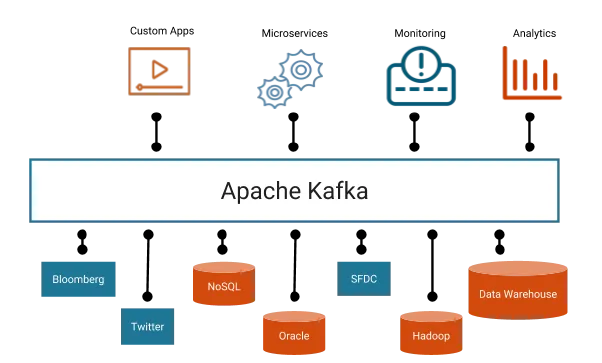
One of the activity in application is to transfer data from Source System to Target System. Over period of time this communication becomes complex and messy. Kafka provides simplicity to build real-time streaming data pipelines and real-time streaming applications.Kafka Cluster sits in the middle of Source System and Target System. Data from Source System is moved to Cluster by Producer and Data from Cluster is moved from to Target System by Consumer.
Source System -> {Producer} -> [Kafka Cluster] -> {Consumer} -> Target System

Kafka Provides Seamless integration across applications hosted in multiple platforms by acting as a intermediate.

- Sequence of message are called Data Stream. Topic is a particular stream of Data. Topics are organized inside cluster. Topics are like rows in a database which are identified by Topic name.
- Cluster Contains Topics -> Topics contains Data Stream -> Data Stream is Made of Seq of Messages
- To add(write) Data to Topic, we use Kafka Producer and to read data we use kafka consumers.
- Topics
- What is Topic? Topics are the categories used to organize messages.Topics are like rows in a table which are identified by Topic name(table name).
- Why it is Needed? Logical channel for producers to publish messages and consumers to receive them I.E. Processing payments, Tracking Assets, Monitoring patients, Tracking Customer Interactions
- How it works? Logical channel for producers to publish messages and consumers to receive them.A topic is a log of events. Logs are easy to understand, because they are simple data structures with well-known semantics.
- Partitions
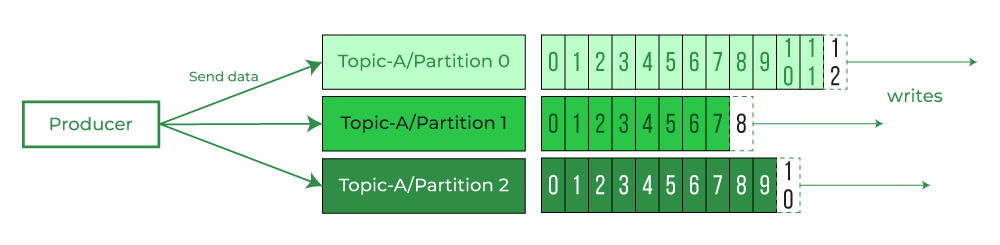
- What are Partitions ? Topics are split into multiple partitions. Messages sent to Topic end up in these partitions, and the messages are ordered by Id(Kafka Partition Offsets). A partition in Kafka is the storage unit that allows for a topic log to be separated into multiple logs and distributed over the Kafka cluster.
Partitions are immutable. Once data written to partition cannot be changed. Data is kept for one Week which is default configuration. - Why Partition is needed? Partitions allow Kafka to scale horizontally by distributing data across multiple brokers.Multiple consumers can read from different partitions in parallel, and multiple producers can write to different partitions simultaneously. Each partition can have multiple replicas spread across different brokers.
- How Partition works? By breaking a single topic log into multiple logs, which are then spread across one or more brokers. This allows Kafka to scale and handle large amounts of data efficiently
- What are Partitions ? Topics are split into multiple partitions. Messages sent to Topic end up in these partitions, and the messages are ordered by Id(Kafka Partition Offsets). A partition in Kafka is the storage unit that allows for a topic log to be separated into multiple logs and distributed over the Kafka cluster.
-
Broker
- What is Broker? is a server that manages the flow of transactions between producers and consumers in Apache Kafka. Kafka brokers store data in topics, which are divided into partitions. Each broker hosts a set of partitions. Brokers handle requests from clients to write and read events to and from partitions
- How Broker works?One broker acts as the Kafka controller (Kafka Broker Leader), which does administrative task, maintaining the state of the other brokers, health check of brokers and reassigning work
- Why Broker is required?Producers connect to a broker to write events, while consumers connect to read events.
- Offset
- What is Offset? Offset is a unique identifier for a message in a Kafka partition. An offset is an integer that represents the position of a message in a partition’s log. The first message in a partition has an offset of 0, the second message has an offset of 1, and so on.
- Why it needed? Offsets enable Kafka to provide sequential, ordered, and replayable data processing. This numerical value helps Kafka keep track of progress within a partition. It also allows Kafka to scale horizontally while staying fault-tolerant.
- How it works? When a producer publishes a message to a Kafka topic, it’s appended to the end of the partition’s log and assigned a new offset. Consumers maintain their current offset, which indicates the last processed message in each partition.
- Producer
- What is Producer? Producer writes data to Kafka broker which would be picked by consumer. A producer can send anything, but it’s typically serialized into a byte array. It can also include a message key, timestamp, compression type, and headers.
- How Producer works? A producer writes messages to a Kafka broker, which then adds a partition and offset ID to the message.
- Why Producer is needed? It allows applications to send streams of data to the Kafka cluster
- Producer uses partitioner to decide to which partition the data should write. Producer doesnot decided the broker rather it endup in the respective broker because of the partition presence.
- Producer has message keys in message which they send. If the key is null, the data is sent using a round-robin mechanism for writing. If the key is not null, then it would end up in the same partition based on the key. Message ordering is possible with key
- Consumer
- What is Consumer? Consumer reads data from Kafka broker.
- How Consumer works? A consumer issues fetch requests to brokers for partitions it wants to consume. It specifies a log offset, and receives a chunk of log that starts at that offset position. The consumer should know in advance the format of the message.
- Why Consumer is needed? It allows applications to receive streams of data from the Kafka broker
- Consumer Group
- What is Consumer Group? a collection of consumer applications that work together to process data from topics in parallel
- How Consumer Group works? A consumer group divides the partitions of a topic among its consumers. Each consumer is assigned a subset of partitions, and only one consumer can process a given partition.
- Why Consumer group is needed?allow multiple consumers to work together to process events from a topic in parallel. This is important for scalability, as it enables consumers to read from many events simultaneously.
-
Messages
- What is Message?Kafka messages are created by the producer using serialization mechanism
- How Message works? Kafka messages are stored as serialized bytes and have a key-value structure
- Why Message is needed? Basic Unit of data in Kafka
- Key is a unique identifier of the Partition, which would be null first time. Value is the actual message. Both Key and value would be in Binary format
-
Partioner
- What is Partioner?Kafka’s partitioning feature is a key part of its ability to scale and handle large amounts of data. Partioning is done by partioner
- How Partioner works?A Kafka partitioner uses hashing to determine which partition a message should be sent to. It employs Key hashing technique that allows for related messages to be grouped together and processed in the correct order. For example, if a Kafka producer uses a user ID as the key for messages about various users, all messages related to a specific user will be sent to the same partition.
-
Zookeeper
- What is Zookeeper?ZooKeeper is a software tool that helps maintain naming and configuration data, and provides synchronization within distributed systems
- How Zookeeper works? Zookeeper keeps track of which brokers are part of the Kafka cluster. Zookeeper is used by Kafka brokers to determine which broker is the leader of a given partition and topic and perform leader elections. Zookeeper stores configurations for topics and permissions. Zookeeper sends notifications to Kafka in case of changes (e.g. new topic, broker dies, broker comes up, delete topics, etc.…)
Factory Method Pattern
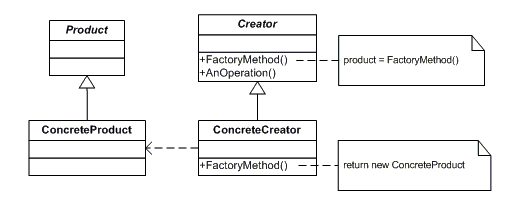
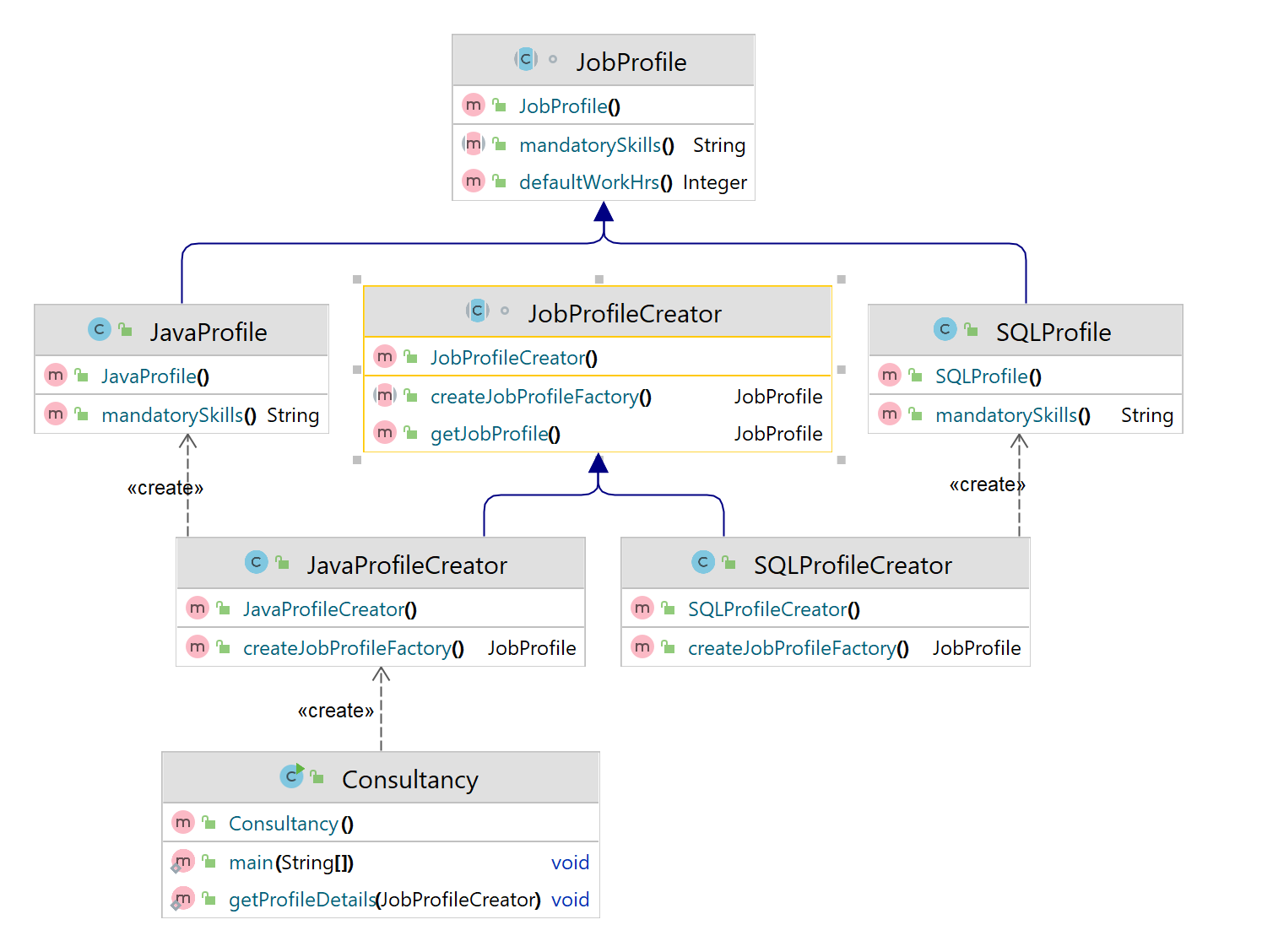
Define an interface for creating an object, but let subclasses decide which class to instantiate. Factory Method lets a class defer instantiation to subclasses.

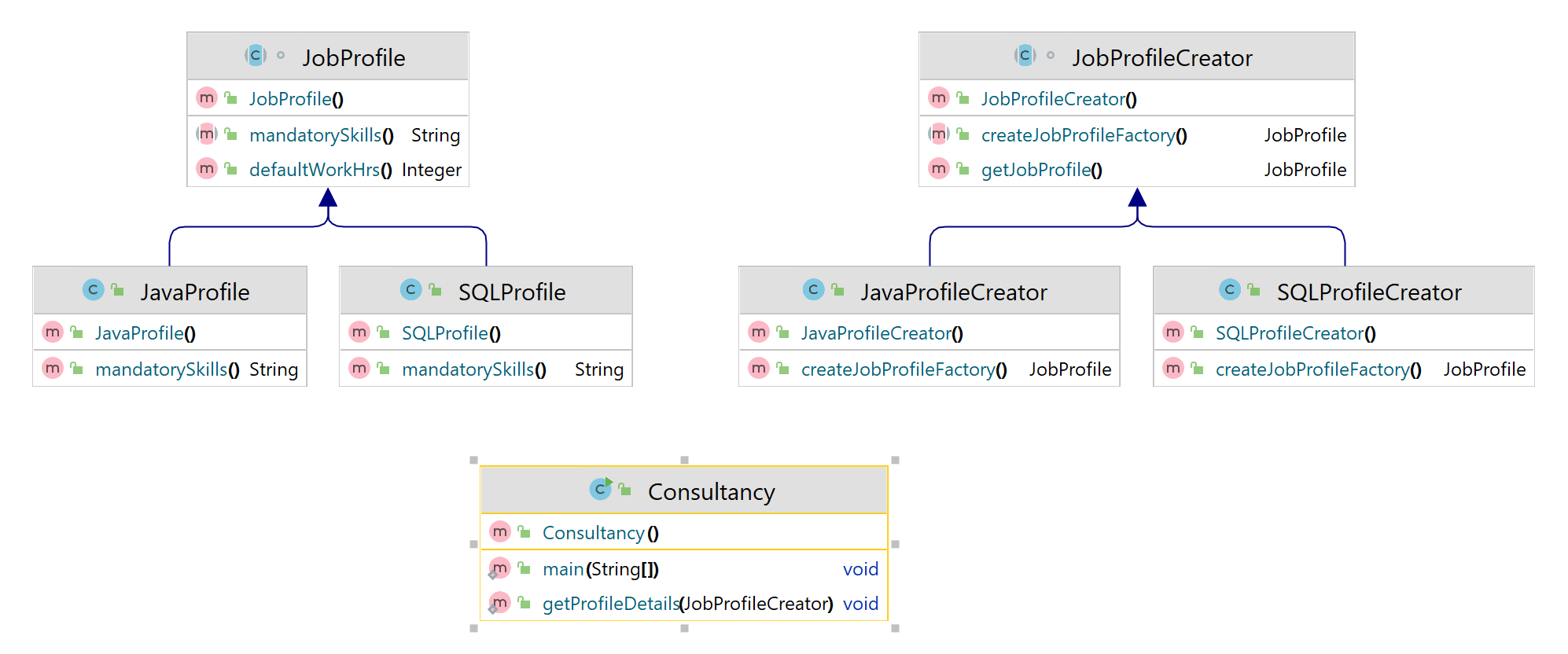
- In Factory Pattern we have Product(Abstract), ConcreteProduct and Creator(Abstract), ConcreteCreator
- ConcreteCreator would create ConcreteProduct by implementing abstract factory method of Creator which has Product return type
- Incase if there is any new Product to be added it fully supports Open Closed Principle(Open For Extension, Closed for Changes).
- Open for Extension – Adding new ConcreteProduct and ConcreateCreator class, Closed for Changes – No changes in anyother code unlike Simple factory or static factory method which requires change in Switchcase, enum (or) if case
- Closed for Changes – No changes in anyother code unlike Simple factory or static factory method which requires change in Switchcase, enum (or) if case

JobProfile.java
abstract class JobProfile {
public abstract String mandatorySkills();
public Integer defaultWorkHrs(){
return 8;
}
}
JavaProfile.java
public class JavaProfile extends JobProfile{
@Override
public String mandatorySkills() {
return "Java, Springboot, Microservices";
}
}
SQLProfile.java
public class SQLProfile extends JobProfile{
@Override
public String mandatorySkills() {
return "Cosmos, MySQL, MSSQL";
}
}
JobProfileCreator.java
abstract class JobProfileCreator {
public JobProfile getJobProfile(){
JobProfile objJobProfile = createJobProfileFactory();
return objJobProfile;
}
public abstract JobProfile createJobProfileFactory();
}
JavaProfileCreator.java
public class JavaProfileCreator extends JobProfileCreator {
@Override
public JobProfile createJobProfileFactory() {
return new JavaProfile();
}
}
SQLProfileCreator.java
public class SQLProfileCreator extends JobProfileCreator {
@Override
public JobProfile createJobProfileFactory() {
return new SQLProfile();
}
}
Consultancy.java
public class Consultancy {
public static void main(String[] args) {
getProfileDetails(new JavaProfileCreator());
}
public static void getProfileDetails(JobProfileCreator jobProfileCreator){
JobProfile objJobProfile = jobProfileCreator.getJobProfile();
System.out.println(objJobProfile.mandatorySkills() + " with "+ objJobProfile.defaultWorkHrs() + "hrs of Work");
}
}
Output
Java, Springboot, Microservices with 8hrs of Work

Simple Factory

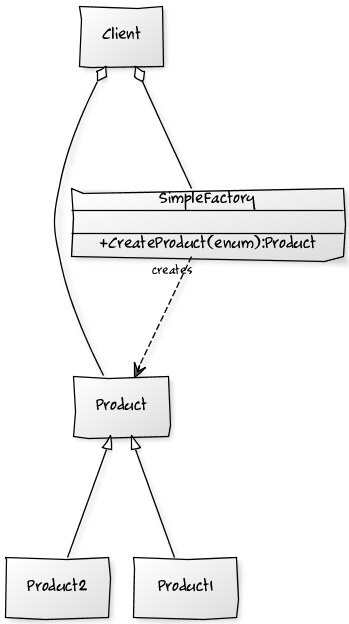
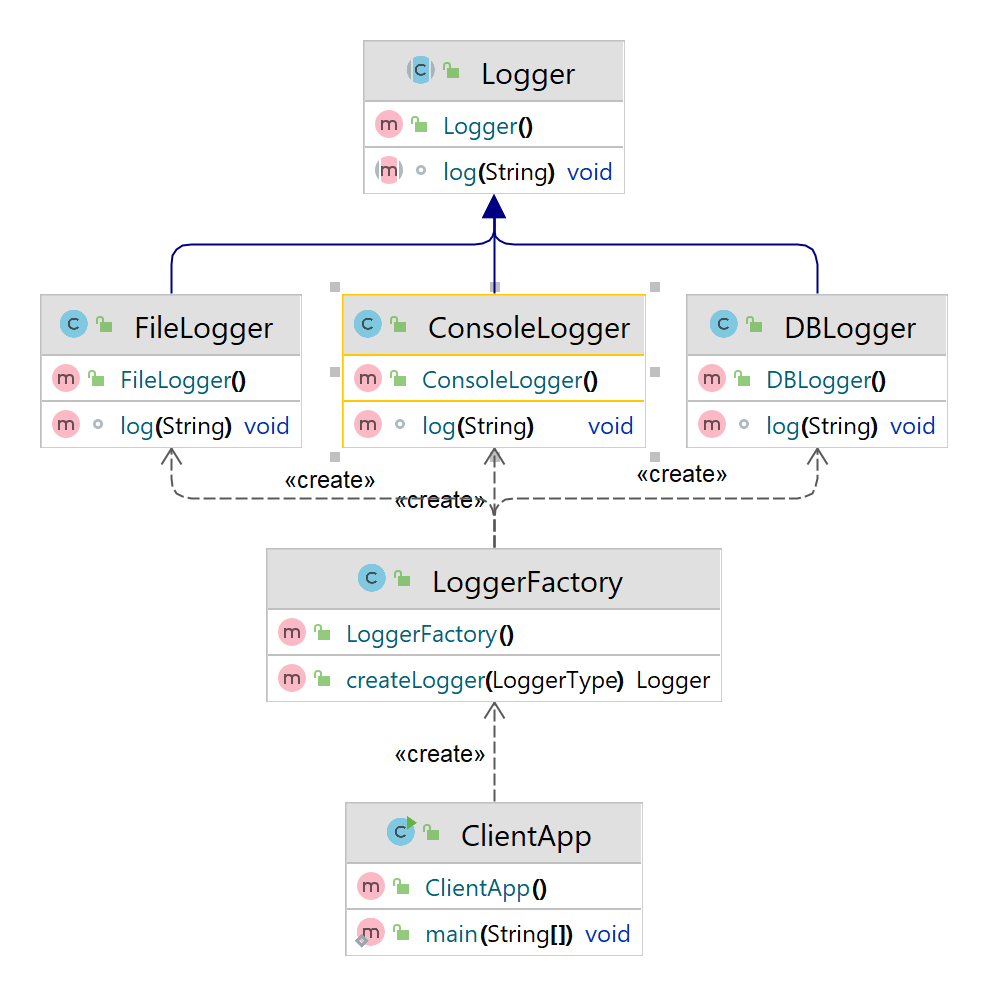
- In Simple Factory we have a Factory Class(LoggerFactory.java) and We call the createLogger method which returns different implementation of logger
- Logger is a abstract class which has different implementations

Logger.java
public abstract class Logger {
abstract void log(String logstring);
}
ConsoleLogger.java
public class ConsoleLogger extends Logger{
@Override
void log(String logstring) {
System.out.println("Logging to Console - "+ logstring);
}
}
DBLogger.java
public class DBLogger extends Logger{
@Override
void log(String logstring) {
System.out.println("Logging to Database - "+ logstring);
}
}
FileLogger.java
public class FileLogger extends Logger{
@Override
void log(String logstring) {
System.out.println("Logging to File - "+ logstring);
}
}
LoggerFactory.java
public class LoggerFactory {
public enum LoggerType {
DATABASE, FILE, CONSOLE;
}
//The same code could be written using if else block instead of switch case
public Logger createLogger(LoggerType loggerType) {
Logger logger;
switch (loggerType) {
case FILE:
logger = new FileLogger();
break;
case DATABASE:
logger = new DBLogger();
break;
case CONSOLE:
logger = new ConsoleLogger();
break;
default:
logger = new ConsoleLogger();
break;
}
return logger;
}
}
ClientApp.java
public class ClientApp {
public static void main(String[] args) {
LoggerFactory objLoggerFactory = new LoggerFactory();
Logger logger = objLoggerFactory.createLogger(LoggerFactory.LoggerType.CONSOLE);
logger.log("Hello there");
}
}
Output
Logging to Console - Hello there
Simple Factory Pattern with HashMap
Factory allows the consumer to create new objects without having to know the details of how they’re created, or what their dependencies are – they only have to give the information they actually want.

Account.java
abstract class Account {
abstract Integer calculateInterest();
}
CreditAccount.java
public class CreditAccount extends Account{
@Override
Integer calculateInterest() {
return 11;
}
}
SalaryAccount.java
public class SalaryAccount extends Account{
@Override
Integer calculateInterest() {
return 5;
}
}
SavingsAccount.java
public class SavingsAccount extends Account{
@Override
Integer calculateInterest() {
return 7;
}
}
AccountFactory.java
public class AccountFactory {
static Map<String, Account> hmAccountMap = new HashMap<>();
static {
hmAccountMap.put("SavingsAcc", new SavingsAccount());
hmAccountMap.put("CreditAcc", new CreditAccount());
hmAccountMap.put("SalaryAcc", new SalaryAccount());
}
public static Account getAccount(String accountType){
return hmAccountMap.get(accountType);
}
}
CalcInterest.java
public class CalcInterest{
public static void main(String[] args) {
Account objAccountFactory = AccountFactory.getAccount("SavingsAcc");
System.out.println("Interest rate is - " + Optional.of(objAccountFactory.calculateInterest()));
}
}
Using Streams for AccountFactory Class
AccountFactory.java
public static Optional<Account> getAccount(String accountType) {
return hmAccountMap.entrySet().stream()
.filter(accParam -> accParam.getKey().equals(accountType))
.findFirst()
.map(Map.Entry::getValue);
}
CalcInterest.java
public class CalcInterest{
public static void main(String[] args) {
Account objAccountFactory = AccountFactory.getAccount("SavingsAcc");
System.out.println("Interest rate is - " + Optional.of(objAccountFactory.calculateInterest()));
}
}
Output
Interest rate is - 7