- Is it right to use @SpringBootTest (or) @ContextConfiguration in Unit Test?
Starting spring for each test is a very expensive operation. It’s not a unit test anymore rather integration test. @SpringBootTest goes further and tries to mimic the processes added by Spring Boot framework for creating the context: Decides what to scan based on package structures, loads external configurations from predefined locations optionally runs autoconfiguration starters and so on and so forth. @SpringBootTest loads the necessary beans and inject into each other.
When using @ContextConfiguration you present way to filter what exactly should be run, what beans to load and to inject into each other. - How to Optimize the Unit test by selectively loading the resource?
You can selectively load the resource during unit test- To test your Respository : use @DataJpaTest annotation for test slice.
- To test your Service layer : use JUnit and Mockito. Here you will mock your Repository
- To test your Controller layer : use @WebMvcTest annotation for test slice or use JUnit and Mockito. Here you will mock your Service in both cases
- To test a Component, such as a third party library wrapper or load some specific beans: use @ExtendWith(SpringExtension.class) and @ContextConfiguration/@Import or @SpringJUnitWebConfig which is the combinaison of the both.
- To do an integration test : use @SpringBootTest
- When to use @SpringBootTest and @ExtendWith(SpringExtension.class)
Use @ExtendWith(SpringExtension.class) without loading the entire application context that is included with @SpringBootTest. As you say it’s a lighter weight approach if you just want to mock beans with @MockBean. @SpringBootTest does in fact include @ExtendWith(SpringExtension.class)Use @SpringBootTest when,
- You need to test the application as a whole, including multiple layers like the web layer, service layer, and repository layer.
- You require an embedded server to run the test, such as when testing web controllers.
- You want to verify the integration of all components in a fully loaded application context.
Use SpringRunner/@ExtendWith(SpringExtension.class) when,
- You are writing unit tests or lightweight integration tests that only need certain features of Spring, such as dependency injection or transaction management, without loading the full application context.
- You want to test specific layers (e.g., service layer) in isolation without the overhead of starting the entire Spring application.
Category Archives: Junit5
Parallel Test in Junit
BaseUnitTest.java
import org.junit.jupiter.api.AfterEach;
import org.junit.jupiter.api.BeforeEach;

import java.util.concurrent.TimeUnit;

public class BaseUnitTest {
    long startTime;
    long endTime;

    @BeforeEach
    public void recordStartTime() {
        startTime = System.currentTimeMillis();
    }

    @AfterEach
    public void recordEndAndExecutionTime() {
        endTime = System.currentTimeMillis();
        System.out.println("Last testcase exection time in millisecond : " +
                              TimeUnit.NANOSECONDS.toMicros((endTime - startTime)) + " Seconds");
    }
}
FirstTest.java
import org.junit.jupiter.api.Test;

class FirstTest extends BaseUnitTest{
    @Test
    void oneSecondTest() throws InterruptedException {
        System.out.println("oneSecondTest() name  =>  " + Thread.currentThread().getName());
        Thread.sleep(1000);
    }

    @Test
    void twoSecondTest() throws InterruptedException {
        System.out.println("twoSecondTest() name => " + Thread.currentThread().getName());
        Thread.sleep(2000);
    }

    @Test
    void threeSecondTest() throws InterruptedException {
        System.out.println("threeSecondTest() name => " + Thread.currentThread().getName());
        Thread.sleep(3000);
    }
}
SecondTest.java
import org.junit.jupiter.api.Test;

public class SecondTest extends BaseUnitTest{
    @Test
    void oneSecondTest() throws InterruptedException {
        System.out.println("oneSecondTest() name => " + Thread.currentThread().getName());
        Thread.sleep(1000);
    }

    @Test
    void twoSecondTest() throws InterruptedException {
        System.out.println("twoSecondTest() name => " + Thread.currentThread().getName());
        Thread.sleep(2000);
    }

    @Test
    void threeSecondTest() throws InterruptedException {
        System.out.println("threeSecondTest() name => " + Thread.currentThread().getName());
        Thread.sleep(3000);
    }
}
ThirdTest.java
import org.junit.jupiter.api.Test;

public class ThirdTest extends BaseUnitTest{
    @Test
    void oneSecondTest() throws InterruptedException {
        System.out.println("oneSecondTest() name => " + Thread.currentThread().getName());
        Thread.sleep(1000);
    }

    @Test
    void twoSecondTest() throws InterruptedException {
        System.out.println("twoSecondTest() name => " + Thread.currentThread().getName());
        Thread.sleep(2000);
    }

    @Test
    void threeSecondTest() throws InterruptedException {
        System.out.println("threeSecondTest() name => " + Thread.currentThread().getName());
        Thread.sleep(3000);
    }
}
Output
Last testcase exection time in millisecond : 0 Seconds
Last testcase exection time in millisecond : 2 Seconds
Last testcase exection time in millisecond : 2 Seconds
Last testcase exection time in millisecond : 2 Seconds
Last testcase exection time in millisecond : 3 Seconds
Last testcase exection time in millisecond : 3 Seconds
Last testcase exection time in millisecond : 3 Seconds
threeSecondTest() name => ForkJoinPool-1-worker-10
twoSecondTest() name => ForkJoinPool-1-worker-7
oneSecondTest() name  =>  ForkJoinPool-1-worker-1
twoSecondTest() name => ForkJoinPool-1-worker-6
oneSecondTest() name => ForkJoinPool-1-worker-3
threeSecondTest() name => ForkJoinPool-1-worker-5
oneSecondTest() name => ForkJoinPool-1-worker-4
twoSecondTest() name => ForkJoinPool-1-worker-8
threeSecondTest() name => ForkJoinPool-1-worker-9
junit-platform.properties
# Enable parallelism
junit.jupiter.execution.parallel.enabled = true

# Enable parallelism for both test methods and classes
junit.jupiter.execution.parallel.mode.default =  concurrent
In Maven Command
>>mvn test -Djunit.jupiter.execution.parallel.enabled=true -Djunit.jupiter.execution.parallel.mode.default=concurrent
Four possibilities in junit-platform.properties config
//Only One class and One method in that class would be executed - Sequential Execution
junit.jupiter.execution.parallel.mode.default =  same_thread
junit.jupiter.execution.parallel.mode.classes.default = same_thread

//More than one class would run in parallel but only one method in each class would be executed
//Test method within one class run sequentially but more than one class run in parallel
junit.jupiter.execution.parallel.mode.default =  same_thread
junit.jupiter.execution.parallel.mode.classes.default = concurrent

//Only One class and Multiple method in that class would be executed
junit.jupiter.execution.parallel.mode.default =  concurrent
junit.jupiter.execution.parallel.mode.classes.default = same_thread

//Multiple classes and Multiple method in  those classes would be executed
junit.jupiter.execution.parallel.mode.default =  concurrent
junit.jupiter.execution.parallel.mode.classes.default = concurrent
Junit5 Fundementals
Junit 5 = Platform + Jupiter + Vintage
- Platform = Engine + Runner + Launcher
- All the Class files needed for Coding Test Cases
- Provides Support for Junit3 and 4
Adding Dependency in pom.xml for Junit 5
JUnit 5 Platform
includes junit-jupiter-api + junit-platform-engine
<dependencies>
    [...]
    <dependency>
        <groupId>org.junit.jupiter</groupId>
        <artifactId>junit-jupiter-engine</artifactId>
        <version>5.4.0</version>
        <scope>test</scope>
    </dependency>
    [...]
</dependencies>
If you want to write and execute JUnit 3 or 4 tests via the JUnit Platform add the Vintage Engine to the dependencies
<dependencies>
    [...]
    <dependency>
        <groupId>org.junit.vintage</groupId>
        <artifactId>junit-vintage-engine</artifactId>
        <version>5.4.0</version>
        <scope>test</scope>
    </dependency>
    [...]
</dependencies>
Junit 5 Annotations
- @BeforeAll, @AfterAll – Runs Before and After Class and should be static
- @DisplayName – Displays description about the Test Method
- @Disabled – @Ignore in Junit 4. Disables the Test Method
- @Nested – Helps in grouping of similar test methods together
- @ParameterizedTest – Supplying more than one input for same method in row using array
- @ValueSource – Provides multiple paramters to same test method for ParameterizedTest
- @CsvSource – Provides multiple paramters to same test method for ParameterizedTest in Key Value Pair. Key is Input and Value is expected Output
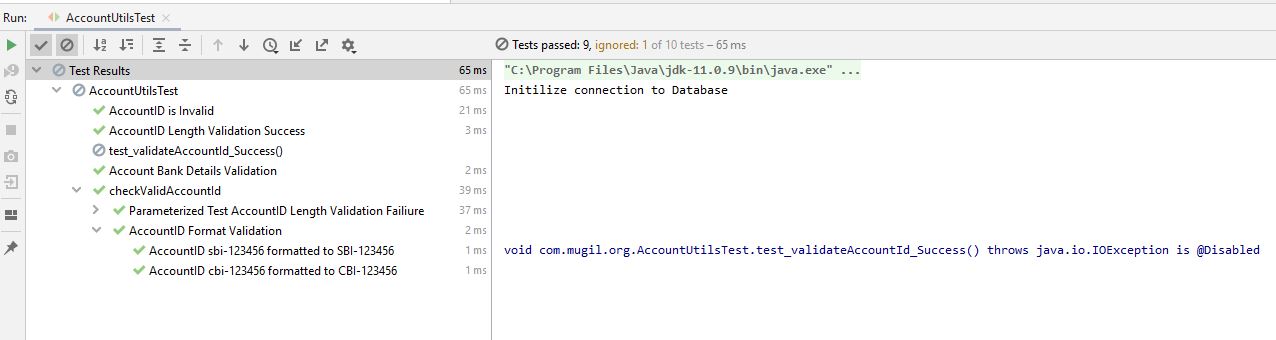
AccountUtils.java
import java.io.IOException;

public class AccountUtils {

    public boolean validateAccountId(String acctNo) throws IOException {
        if (getAccountIDLength(acctNo)) {
            return true;
        } else {
            throw new IOException("Account ID is Invalid");
        }
    }

    public boolean getAccountIDLength(String acctNo)
    {
        if(acctNo.length() < 5) return false;
        if(acctNo.length() > 10) return false;
        if(!acctNo.contains("-")) return false;

        return true;
    }

    public  String getFormattedAccID(String accountNo){
        return accountNo.toUpperCase();
    }

    public String[] getBankDetails(String accountNo){
        String[] arrAccountDetails = accountNo.split("-");
        return arrAccountDetails;
    }
}
AccountUtilsTest.java
import org.junit.jupiter.api.*;
import org.junit.jupiter.params.ParameterizedTest;
import org.junit.jupiter.params.provider.CsvSource;
import org.junit.jupiter.params.provider.ValueSource;

import java.io.IOException;

import static org.junit.jupiter.api.Assertions.fail;

public class AccountUtilsTest {

    AccountUtils systemUnderTest = new AccountUtils();

    @BeforeAll
    static void init(){
        System.out.println("Initilize connection to Database");
    }

    @AfterAll
    static void destroy(){
        System.out.println("Deallocate connection to Database");
    }

    @Test
    @DisplayName("AccountID Length Validation Success")
    void test_getAccountIDLength_Success(){
        boolean expectedOutput = true;
        boolean actualOutput = systemUnderTest.getAccountIDLength("SBI-104526");

        Assertions.assertEquals(expectedOutput, actualOutput);
        Assertions.assertTrue(actualOutput);
    }

    @Test
    @Disabled
    void test_validateAccountId_Success() throws IOException {
        Assertions.assertTrue(systemUnderTest.validateAccountId("SBI-104526"));
    }

    @Test
    @DisplayName("AccountID is Invalid ")
    void test_validateAccountId_Exception(){
        Assertions.assertThrows(IOException.class, ()->{
            systemUnderTest.validateAccountId("");
        });
    }

    @Test
    @DisplayName("Account Bank Details Validation")
    void test_AccountIDForBankName_Success(){
        String[] expectedOutput = new String[]{"SBI", "104526"};
        String[] actualOutput = systemUnderTest.getBankDetails("SBI-104526");

        Assertions.assertArrayEquals(expectedOutput, actualOutput);
    }

    @Nested
    class checkValidAccountId
    {
        @ParameterizedTest
        @ValueSource(strings={"SBI", "SBI-123456789", " ", ""})
        @DisplayName("Parameterized Test AccountID Length Validation Failiure")
        void test_getAccountIDLength_Failiure(String accountId){
            Assertions.assertFalse(systemUnderTest.getAccountIDLength(accountId));
        }

        @ParameterizedTest(name="AccountID {0} formatted to {1}")
        @CsvSource(value={"sbi-123456, SBI-123456", "cbi-123456, CBI-123456"})
        @DisplayName("AccountID Format Validation")
        void getFormattedAccID_Success(String inputString, String expectedOutput){
            Assertions.assertEquals(expectedOutput, systemUnderTest.getFormattedAccID(inputString));
        }
    }
}
Using TestTraits in Mockito
TestTraits.java
public interface TestTraits {
    String EMPLOYEE_ID = "1";
    Long EMPLOYEE_ID_LONG = 1L;

    default EmployeeRpy getEmployee(){
        EmployeeRpy objEmpRpy = new EmployeeRpy();
        objEmpRpy.setEmpName("Mugil");
        objEmpRpy.setEmpAge("34");
        return objEmpRpy;

     default EmployeeDetailsResource createMockedEmployeeDetails()
          throws IOException(){
       EmployeeDetailsResource objEmployeeDetailsResource =
              new Gson.fromJson(getReader("json-data/EmployeeDetails.json"), EmployeeDetails.class);
       return objEmployeeDetailsResource;
     }

     default Reader getReader(String filePath) throws IOException{
       return new FileReader(new ClassPathResource(filePath).getFile());
     }
}
EmployeeDetails.json
  {
     "empID" : "101",
     "empName" : "Mugilvannan",
     "empAge" : "30"
  }
EmployeeMgmtTest.java
 @ExtendWith({MockitoExtension.class})
 class EmployeeMgmtTest implements TestTraits{
    .
    .
    Code for Testing Goes Here
    .
    .
 }