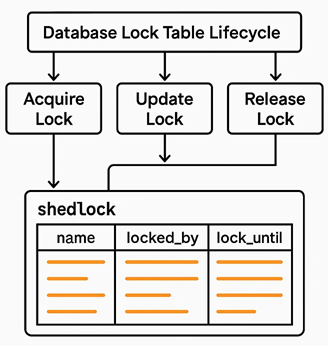
Simple Shedlock Code

pom.xml

	<dependency>
			<groupId>net.javacrumbs.shedlock</groupId>
			<artifactId>shedlock-spring</artifactId>
			<version>5.13.0</version>
		</dependency>
		<dependency>
			<groupId>net.javacrumbs.shedlock</groupId>
			<artifactId>shedlock-provider-jdbc-template</artifactId>
			<version>5.13.0</version>
		</dependency>

ShedLockConfig.java

import net.javacrumbs.shedlock.core.LockProvider;
import net.javacrumbs.shedlock.provider.jdbctemplate.JdbcTemplateLockProvider;
import org.springframework.context.annotation.Bean;
import org.springframework.context.annotation.Configuration;
import org.springframework.jdbc.core.JdbcTemplate;

import javax.sql.DataSource;

@Configuration
public class ShedLockConfig {

    @Bean
    public LockProvider lockProvider(DataSource dataSource) {
        return new JdbcTemplateLockProvider(
                JdbcTemplateLockProvider.Configuration.builder()
                        .withJdbcTemplate(new JdbcTemplate(dataSource))
                        .withTableName("empmgmt.shedlock")
                        .build()

        );
    }
}

ShedlockDemoApplication.java

import net.javacrumbs.shedlock.spring.annotation.EnableSchedulerLock;
import org.springframework.boot.SpringApplication;
import org.springframework.boot.autoconfigure.SpringBootApplication;
import org.springframework.scheduling.annotation.EnableScheduling;

@SpringBootApplication
@EnableScheduling
@EnableSchedulerLock(defaultLockAtMostFor = "PT4M")
public class ShedlockDemoApplication {
    public static void main(String[] args) {
        SpringApplication.run(ShedlockDemoApplication.class, args);
    }
}

PostFetchScheduler.java
fetchPosts method is called every minute

@Component
class PostFetchScheduler {

    final PostFetchService postFetchService;

    PostFetchScheduler(PostFetchService postFetchService) {
        this.postFetchService = postFetchService;
    }

    @Scheduled(cron = "0 */1 * ? * *")
    @SchedulerLock(name = "fetchPosts", lockAtMostFor = "PT2M", lockAtLeastFor = "PT1M")
    void fetchPosts() {
        postFetchService.fetchPosts();
    }
}

How to run the code

  1. Shedlock table should be created manually in database
      CREATE TABLE shedlock (
        name VARCHAR(64) NOT NULL,         -- lock name
        lock_until TIMESTAMP NOT NULL,     -- time until lock is valid
        locked_at TIMESTAMP NOT NULL,      -- time when lock was acquired
        locked_by VARCHAR(255) NOT NULL,   -- identifier of the node that holds the lock
        PRIMARY KEY (name)
    );
      
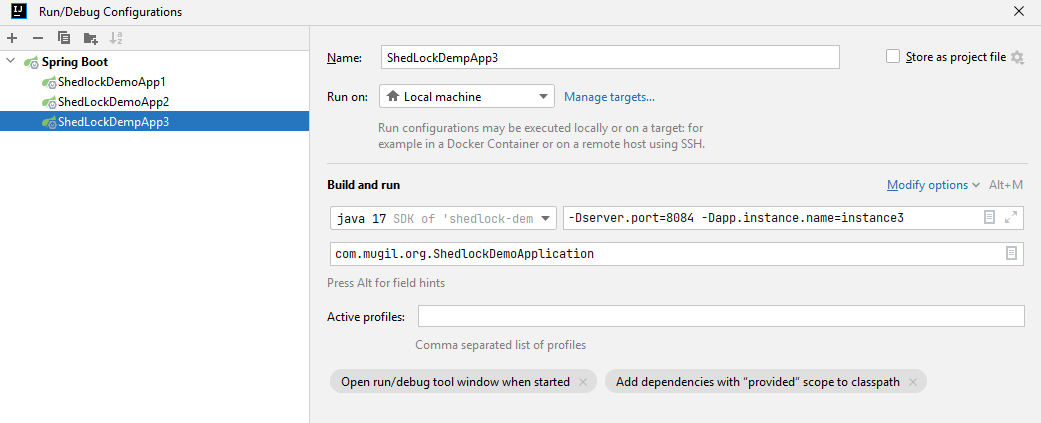
  2. Start multiple instance by supplying server.port and instance name as parameter
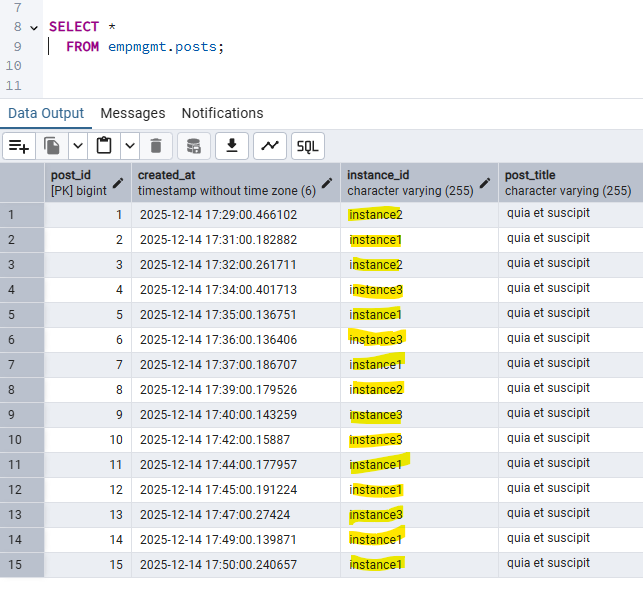
  3. First instance would create table in DB for posts for code in repo
Output
FAQ
Why we are defining lock timing at 2 places?

@EnableSchedulerLock(defaultLockAtMostFor = "PT4M") 
 

vs

  @SchedulerLock(name = "fetchPosts", lockAtMostFor = "PT2M", lockAtLeastFor = "PT1M")
 

@EnableSchedulerLock sets defaults for all tasks. A fallback setting for all tasks.

@SchedulerLock gives per-task overrides with more precise control. Fine-grained control, overriding the default for specific jobs.

Repo Link

Why to use Liquibase?
Liquibase simplifies – Database Version Control and Automation of Database Migrations

pom.xml

<dependency>
   <groupId>org.liquibase</groupId>
   <artifactId>liquibase-core</artifactId>
</dependency>

Simple Liquibase Script Example?
db.changelog-master.xml

<?xml version="1.0" encoding="UTF-8"?>
<databaseChangeLog
        xmlns="http://www.liquibase.org/xml/ns/dbchangelog"
        xmlns:xsi="http://www.w3.org/2001/XMLSchema-instance"
        xsi:schemaLocation="http://www.liquibase.org/xml/ns/dbchangelog
        http://www.liquibase.org/xml/ns/dbchangelog/dbchangelog-4.15.xsd">
    <include file="/db/changelog/1-createtable-changeset.xml"/>
    <include file="/db/changelog/2-altertable-changeset.xml"/>
    <include file="/db/changelog/3-inserttable-changeset.xml"/>
    <include file="/db/changelog/4-storedprocedure-changeset.xml"/>
    <include file="/db/changelog/5-createtable-address-changeset.xml"/>
</databaseChangeLog>

1-createtable-changeset.xml

<databaseChangeLog
        xmlns="http://www.liquibase.org/xml/ns/dbchangelog"
        xmlns:xsi="http://www.w3.org/2001/XMLSchema-instance"
        xsi:schemaLocation="http://www.liquibase.org/xml/ns/dbchangelog
        http://www.liquibase.org/xml/ns/dbchangelog/dbchangelog-4.15.xsd">

    <!-- Create schema -->
    <changeSet id="create-table" author="mugil">
        <createTable tableName="employee" schemaName="empmgmt">
            <column name="id" type="INT" autoIncrement="true">
                <constraints primaryKey="true" nullable="false"/>
            </column>
            <column name="emp_name" type="VARCHAR(50)"/>
        </createTable>
    </changeSet>
</databaseChangeLog>

Does the whole script runs everytime in liquibase?
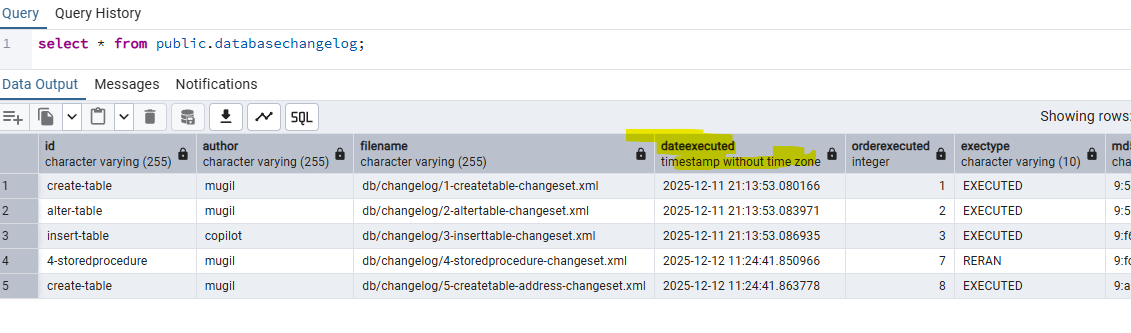
No. liquibase does not run the whole script all the time. liquibase maintains a databasechangelog table internally. This table keeps track of the new scripts and already executed scripts in form of history table.

How liquibase distinguish between script which is already executed and script which needs to be executed?
liquibase ID, Author and Chanelog file name to uniquely generate a MD5 Checksum value. This unique value helps in distinguish between old script which is already executed a new script to be executed


Is there a way I could run the script again in liquibase?
Yes. There is a way by deleting the MD5sum value in the database which makes the liquibase engine to run script again. You can also delete all the rows in the liquibase change log table which makes the script to get executed one more time.

Is there a way to confirm changelog files executed when the application starts?
2 Ways

You can confirm from server log displayed at the time of server startup.

You can also confirm from database change log table

How to run a script again and again in liquibase?
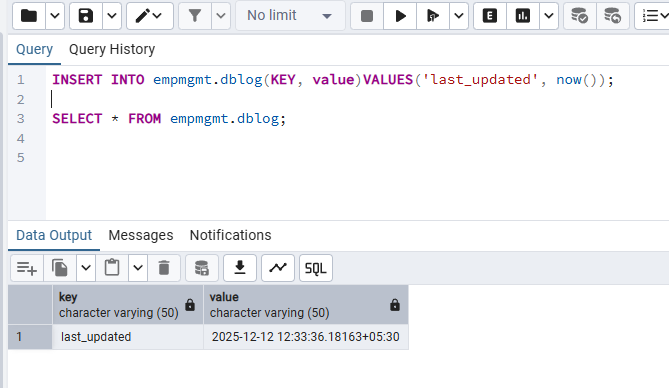
By using runAlways=”true” in changeset. Liquibase ignores the DATABASECHANGELOG execution history for that changeset. Every run applies the SQL, even if identical.

<changeSet id="insert_seed_data" author="dev" runAlways="true">
    <insert tableName="config">
        <column name="key" value="last_updated"/>
        <column name="value" value="NOW()"/>
    </insert>
</changeSet>

When to use runOnChange parameter in changeset?
If you are making changes to view or stored procedure then use runOnChange set to true. Liquibase ignores the DATABASECHANGELOG execution history for that changeset. Every run applies the SQL, even if identical.

When to use runOnChange parameter in changeset?
If you are making changes to view or stored procedure then use runOnChange set to true. Liquibase ignores the DATABASECHANGELOG execution history for that changeset. Every run applies the SQL, even if identical.

Other Notes:
You can confirm scripts that would be executed by using liquibase:updateSQL which generates list of scripts to be executed.

Code Repo

Why Shedlock?
Shedlock prevents concurrent execution of scheduled tasks in distributed systems. In a server where multiple instance of same JAR running, shedlock prevents simultaneous execution of task by different instance at the same time. By this shedlock prevents race conditions and prevents multiple nodes from executing the same task simultaneously, which can lead to data corruption or duplication

Before Shedlock

Application Schedule Job
└─▶ PCF Inst A: tries to gets lock → runs job
└─▶ PCF Inst B: tries to gets lock → runs job
└─▶ PCF Inst C: tries to gets lock → runs job

Post Shedlock

Application Schedule Job
└─▶ PCF Inst A: tries to gets lock → runs job
└─▶ PCF Inst B: Waits for lock release → runs job
└─▶ PCF Inst C: Waits for lock release → runs job

When to use Shedlock?
If you have same scheduled job running in more than one instance.

How Shedlock Works?

  1. When a scheduled task is triggered, ShedLock checks a shared lock (e.g., in a database table).
  2. If the lock is free, it acquires it and runs the task.
  3. If another instance already holds the lock, the task is skipped.
  4. The lock has an expiration time to handle crashes or failures gracefully.

Use cases
Sending emails or notifications, Generating reports, Cleaning up expired sessions or data, Syncing data with external systems

FAQ
atLeast and atMost Lock time in shedlock?
In ShedLock, atLeast and atMost are parameters used to control the duration of the lock for scheduled tasks. They help ensure that tasks are executed safely and efficiently in distributed environments.

Example:

atLeast = 5m means the lock will stay held for at least 5 minutes, even if the task finishes in 1 minute. this prevents other instances from immediately picking up the task again, useful for throttling or spacing out executions.

atMost = 10m means the lock will automatically release after 10 minutes, even if the task hasn’t finished. atMost is needed incase the task fails and to prevent resource from holding for long time.

The @SchedulerLock annotation in ShedLock is used to control distributed locking for scheduled tasks

@Scheduled(cron = "0 0 * * * *") // every hour
@SchedulerLock(name = "hourlyTask", atLeast = "30m", atMost = "1h")
public void hourlyTask() {
    // task logic here
}
  1. The task runs only once per hour across all instances.
  2. The lock is held for at least 30 minutes, even if the task finishes early.
  3. The lock is released after 1 hour, even if the task hangs.

Can another instance Instance2 can execute the job, if Instance1 job is completed within 30 Minutes(atleast Time)?
No. The atLeast duration is a guaranteed lock time, not tied to actual job execution. Instance2 cannot start the job during this 30-minute window because the lock is still active. Even when the instance1 job is completed within 30 minutes instance2 job cannot be started unless the lock is released.

What happens when atLeastTime is more than Schedule Interval of Job
Lets say we have a job which runs every 4 minutes. We have a Shedlock which has minimum lock time of 5 Minutes and max of 10 Minutes. Now in this scenario job would run in 8th, 16th, 28th, 36th Minute the job would run

               |-------------|-------------|-------------|-------------|-------------|-------------|-------------|
TimeLine       0-------------5-------------10------------15------------20------------25------------30------------35
Lock Time      <------L----->|<-----NL---->|<-----L----->|<-----NL---->|<-----L----->|<-----NL---->|<-----L----->|
Job Exe Inter  0----------4----------8----------12----------16---------20---------24---------28---------32--------

L -> Resource Locked
NL -> Resource Unavailable

In the above Job Execution would work when the Lock Time is NL

What if there is a Negative Scenario as below

  1. Where the resource is locked and shedlock releases the resource
  2. The Time of Release of Resource and Job Execution Interval are same

Lets have a scenario where the atmost Time is 5 Minutes and Job Execution Interval is also 5 Minutes. In this case the Job may or may not run as expected.

The Job runs at 00:05:00 When Lock is released on 00:05:00
The Job wont run at 00:05:00 When Lock is released on 00:05:01

Its a good practice to have atmost time less than schedule interval time. I.E. 00:04:50 in the above case

Should I use Shedlock while updating db tables?
If updating database tables as part of a scheduled task in a distributed system using shedlock would be good option. this prevents Duplicate Execution and Data Integrity

Why we are defining lock timing at 2 places?

@EnableSchedulerLock(defaultLockAtMostFor = "PT4M") 
 

vs

  @SchedulerLock(name = "fetchPosts", lockAtMostFor = "PT2M", lockAtLeastFor = "PT1M")
 

@EnableSchedulerLock sets defaults for all tasks. A fallback setting for all tasks.

@SchedulerLock gives per-task overrides with more precise control. Fine-grained control, overriding the default for specific jobs.
What is Race Condition?

# Initial balance = 100
Thread A: balance += 50 # Expected: 150
Thread B: balance -= 30 # Expected: 70

If both threads read the balance at the same time (100), and then write their results, the final balance could be either 120, 150, or 70, depending on timing