Simple Shedlock Code

pom.xml

	<dependency>
			<groupId>net.javacrumbs.shedlock</groupId>
			<artifactId>shedlock-spring</artifactId>
			<version>5.13.0</version>
		</dependency>
		<dependency>
			<groupId>net.javacrumbs.shedlock</groupId>
			<artifactId>shedlock-provider-jdbc-template</artifactId>
			<version>5.13.0</version>
		</dependency>

ShedLockConfig.java

import net.javacrumbs.shedlock.core.LockProvider;
import net.javacrumbs.shedlock.provider.jdbctemplate.JdbcTemplateLockProvider;
import org.springframework.context.annotation.Bean;
import org.springframework.context.annotation.Configuration;
import org.springframework.jdbc.core.JdbcTemplate;

import javax.sql.DataSource;

@Configuration
public class ShedLockConfig {

    @Bean
    public LockProvider lockProvider(DataSource dataSource) {
        return new JdbcTemplateLockProvider(
                JdbcTemplateLockProvider.Configuration.builder()
                        .withJdbcTemplate(new JdbcTemplate(dataSource))
                        .withTableName("empmgmt.shedlock")
                        .build()

        );
    }
}

ShedlockDemoApplication.java

import net.javacrumbs.shedlock.spring.annotation.EnableSchedulerLock;
import org.springframework.boot.SpringApplication;
import org.springframework.boot.autoconfigure.SpringBootApplication;
import org.springframework.scheduling.annotation.EnableScheduling;

@SpringBootApplication
@EnableScheduling
@EnableSchedulerLock(defaultLockAtMostFor = "PT4M")
public class ShedlockDemoApplication {
    public static void main(String[] args) {
        SpringApplication.run(ShedlockDemoApplication.class, args);
    }
}

PostFetchScheduler.java
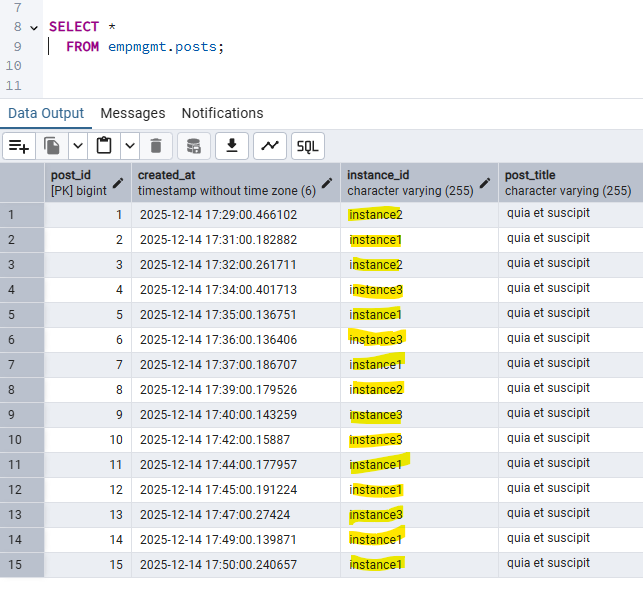
fetchPosts method is called every minute

@Component
class PostFetchScheduler {

    final PostFetchService postFetchService;

    PostFetchScheduler(PostFetchService postFetchService) {
        this.postFetchService = postFetchService;
    }

    @Scheduled(cron = "0 */1 * ? * *")
    @SchedulerLock(name = "fetchPosts", lockAtMostFor = "PT2M", lockAtLeastFor = "PT1M")
    void fetchPosts() {
        postFetchService.fetchPosts();
    }
}

How to run the code

  1. Shedlock table should be created manually in database
      CREATE TABLE shedlock (
        name VARCHAR(64) NOT NULL,         -- lock name
        lock_until TIMESTAMP NOT NULL,     -- time until lock is valid
        locked_at TIMESTAMP NOT NULL,      -- time when lock was acquired
        locked_by VARCHAR(255) NOT NULL,   -- identifier of the node that holds the lock
        PRIMARY KEY (name)
    );
      
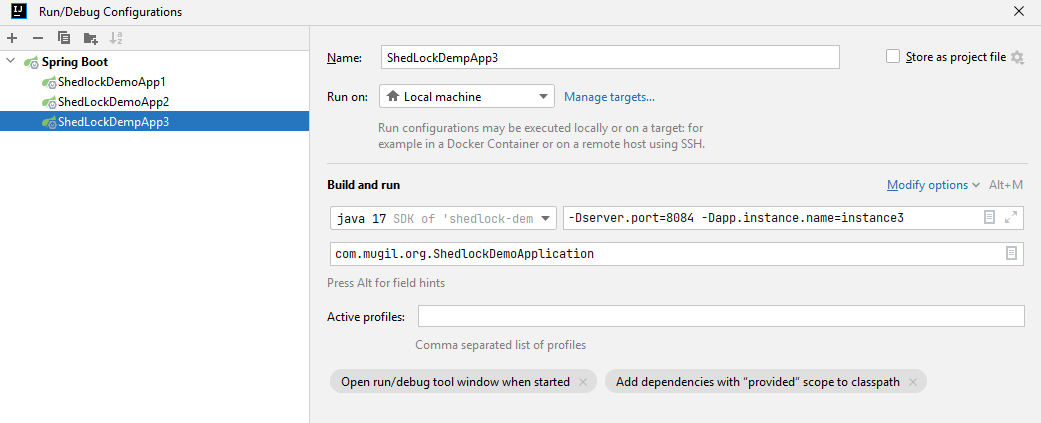
  2. Start multiple instance by supplying server.port and instance name as parameter
  3. First instance would create table in DB for posts for code in repo
Output
FAQ
Why we are defining lock timing at 2 places?

@EnableSchedulerLock(defaultLockAtMostFor = "PT4M") 
 

vs

  @SchedulerLock(name = "fetchPosts", lockAtMostFor = "PT2M", lockAtLeastFor = "PT1M")
 

@EnableSchedulerLock sets defaults for all tasks. A fallback setting for all tasks.

@SchedulerLock gives per-task overrides with more precise control. Fine-grained control, overriding the default for specific jobs.

Repo Link

Why to use Liquibase?
Liquibase simplifies – Database Version Control and Automation of Database Migrations

pom.xml

<dependency>
   <groupId>org.liquibase</groupId>
   <artifactId>liquibase-core</artifactId>
</dependency>

Simple Liquibase Script Example?
db.changelog-master.xml

<?xml version="1.0" encoding="UTF-8"?>
<databaseChangeLog
        xmlns="http://www.liquibase.org/xml/ns/dbchangelog"
        xmlns:xsi="http://www.w3.org/2001/XMLSchema-instance"
        xsi:schemaLocation="http://www.liquibase.org/xml/ns/dbchangelog
        http://www.liquibase.org/xml/ns/dbchangelog/dbchangelog-4.15.xsd">
    <include file="/db/changelog/1-createtable-changeset.xml"/>
    <include file="/db/changelog/2-altertable-changeset.xml"/>
    <include file="/db/changelog/3-inserttable-changeset.xml"/>
    <include file="/db/changelog/4-storedprocedure-changeset.xml"/>
    <include file="/db/changelog/5-createtable-address-changeset.xml"/>
</databaseChangeLog>

1-createtable-changeset.xml

<databaseChangeLog
        xmlns="http://www.liquibase.org/xml/ns/dbchangelog"
        xmlns:xsi="http://www.w3.org/2001/XMLSchema-instance"
        xsi:schemaLocation="http://www.liquibase.org/xml/ns/dbchangelog
        http://www.liquibase.org/xml/ns/dbchangelog/dbchangelog-4.15.xsd">

    <!-- Create schema -->
    <changeSet id="create-table" author="mugil">
        <createTable tableName="employee" schemaName="empmgmt">
            <column name="id" type="INT" autoIncrement="true">
                <constraints primaryKey="true" nullable="false"/>
            </column>
            <column name="emp_name" type="VARCHAR(50)"/>
        </createTable>
    </changeSet>
</databaseChangeLog>

Does the whole script runs everytime in liquibase?
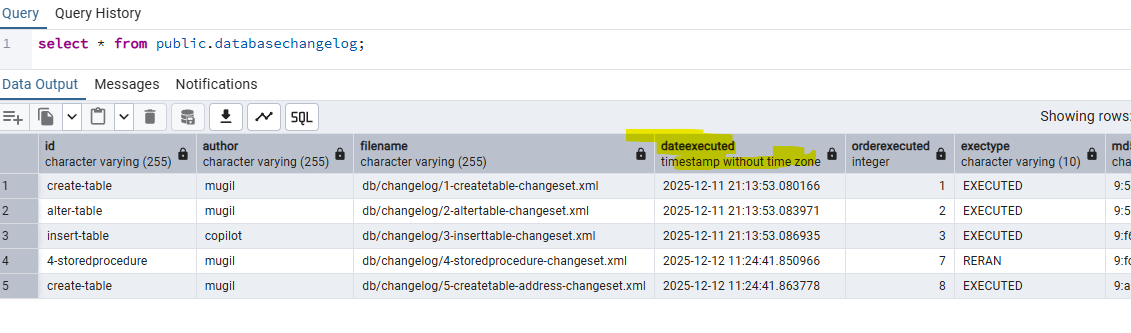
No. liquibase does not run the whole script all the time. liquibase maintains a databasechangelog table internally. This table keeps track of the new scripts and already executed scripts in form of history table.

How liquibase distinguish between script which is already executed and script which needs to be executed?
liquibase ID, Author and Chanelog file name to uniquely generate a MD5 Checksum value. This unique value helps in distinguish between old script which is already executed a new script to be executed


Is there a way I could run the script again in liquibase?
Yes. There is a way by deleting the MD5sum value in the database which makes the liquibase engine to run script again. You can also delete all the rows in the liquibase change log table which makes the script to get executed one more time.

Is there a way to confirm changelog files executed when the application starts?
2 Ways

You can confirm from server log displayed at the time of server startup.

You can also confirm from database change log table

How to run a script again and again in liquibase?
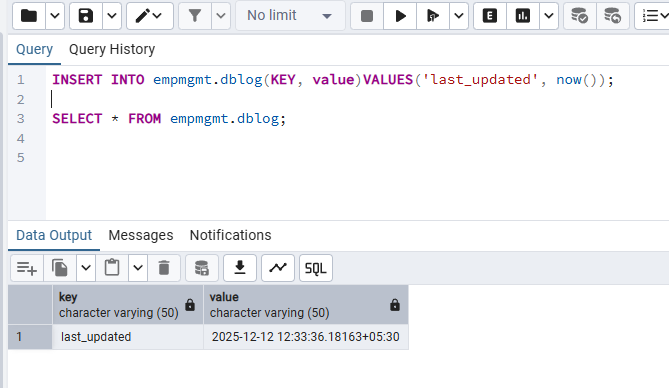
By using runAlways=”true” in changeset. Liquibase ignores the DATABASECHANGELOG execution history for that changeset. Every run applies the SQL, even if identical.

<changeSet id="insert_seed_data" author="dev" runAlways="true">
    <insert tableName="config">
        <column name="key" value="last_updated"/>
        <column name="value" value="NOW()"/>
    </insert>
</changeSet>

When to use runOnChange parameter in changeset?
If you are making changes to view or stored procedure then use runOnChange set to true. Liquibase ignores the DATABASECHANGELOG execution history for that changeset. Every run applies the SQL, even if identical.

When to use runOnChange parameter in changeset?
If you are making changes to view or stored procedure then use runOnChange set to true. Liquibase ignores the DATABASECHANGELOG execution history for that changeset. Every run applies the SQL, even if identical.

Other Notes:
You can confirm scripts that would be executed by using liquibase:updateSQL which generates list of scripts to be executed.

Code Repo