- Spring Batch Architecture
- Simple Spring Batch Application
- Item Reader and Item Writer
- Spring Batch Reading and Writing to REST Endpoints
- Triggering Spring Batch Job using REST Endpoints
- Fault Tolerance and Error Handling
- Data Migration using Spring Batch
Monthly Archives: September 2025
Using Item Reader and Writer to Read and Write from CSV, JSON, JDBC and Flat Text File
jobconfig.java
package com.mugil.org.config;

import com.fasterxml.jackson.core.JsonProcessingException;
import com.fasterxml.jackson.databind.ObjectMapper;
import com.fasterxml.jackson.databind.SerializationFeature;
import com.mugil.org.model.Employee;
import com.mugil.org.model.EmployeeCSV;
import com.mugil.org.model.EmployeeJSON;
import com.mugil.org.model.EmployeeJdbc;
import org.springframework.batch.core.*;
import org.springframework.batch.core.job.builder.JobBuilder;
import org.springframework.batch.core.launch.support.RunIdIncrementer;
import org.springframework.batch.core.repository.JobRepository;
import org.springframework.batch.core.step.builder.StepBuilder;
import org.springframework.batch.item.ItemProcessor;
import org.springframework.batch.item.database.BeanPropertyItemSqlParameterSourceProvider;
import org.springframework.batch.item.database.JdbcBatchItemWriter;
import org.springframework.batch.item.database.JdbcCursorItemReader;
import org.springframework.batch.item.database.builder.JdbcBatchItemWriterBuilder;
import org.springframework.batch.item.database.builder.JdbcCursorItemReaderBuilder;
import org.springframework.batch.item.file.FlatFileItemReader;
import org.springframework.batch.item.file.FlatFileItemWriter;
import org.springframework.batch.item.file.LineMapper;
import org.springframework.batch.item.file.builder.FlatFileItemReaderBuilder;
import org.springframework.batch.item.file.builder.FlatFileItemWriterBuilder;
import org.springframework.batch.item.file.mapping.BeanWrapperFieldSetMapper;
import org.springframework.batch.item.file.mapping.DefaultLineMapper;
import org.springframework.batch.item.file.transform.BeanWrapperFieldExtractor;
import org.springframework.batch.item.file.transform.DelimitedLineAggregator;
import org.springframework.batch.item.file.transform.DelimitedLineTokenizer;
import org.springframework.batch.item.file.transform.LineAggregator;
import org.springframework.batch.item.json.JacksonJsonObjectReader;
import org.springframework.batch.item.json.JsonItemReader;
import org.springframework.batch.item.json.builder.JsonItemReaderBuilder;
import org.springframework.beans.factory.annotation.Autowired;
import org.springframework.context.annotation.Bean;
import org.springframework.context.annotation.Configuration;
import org.springframework.core.io.FileSystemResource;
import org.springframework.jdbc.core.BeanPropertyRowMapper;
import org.springframework.transaction.PlatformTransactionManager;

import javax.sql.DataSource;
import java.util.Date;

@Configuration
public class JobConfig {
    @Autowired
    ItemProcessor simpleJobProcessor;

    @Autowired
    DataSource dataSource;

    @Bean
    public Job job(JobRepository jobRepository, PlatformTransactionManager transactionManager) {
        return new JobBuilder("job", jobRepository)
                .incrementer(new RunIdIncrementer())
                .start(simpleChunkStep(jobRepository, transactionManager))
                .build();
    }

    @Bean
    public Step simpleChunkStep(JobRepository jobRepository, PlatformTransactionManager transactionManager) {
        StepBuilder stepBuilderOne = new StepBuilder("Chunk Oriented Step", jobRepository);
        return stepBuilderOne
                .chunk(3, transactionManager)
                .reader(flatFileItemReader())
                .processor(simpleJobProcessor)
                .writer(jdbcWriter())
                .build();
    }

    @Bean
    public JsonItemReader<EmployeeJSON> jsonFileReader() {
        return new JsonItemReaderBuilder<EmployeeJSON>()
                .name("employeeJSONReader")
                .jsonObjectReader(new JacksonJsonObjectReader<>(EmployeeJSON.class))
                .currentItemCount(1)  //Skip the first item
                .maxItemCount(3) //Limit reading to a maximum of 3 items from the file
                .resource(new FileSystemResource("EmployeeList.json"))
                .build();
    }

    @Bean
    public FlatFileItemWriter<EmployeeJSON> jsonFileWriter() {
        ObjectMapper objectMapper = new ObjectMapper();
        objectMapper.enable(SerializationFeature.INDENT_OUTPUT); // Optional: pretty print

        LineAggregator<EmployeeJSON> jsonLineAggregator = item -> {
            try {
                return objectMapper.writeValueAsString(item);
            } catch (JsonProcessingException e) {
                throw new RuntimeException("Error converting Employee to JSON", e);
            }
        };

        return new FlatFileItemWriterBuilder<EmployeeJSON>()
                .name("employeeJsonTxtWriter")
                .resource(new FileSystemResource("OutputFiles/employees.json"))
                .lineAggregator(jsonLineAggregator)
                .build();
    }

    @Bean
    public FlatFileItemReader<Employee> flatFileItemReader() {
        FlatFileItemReader<Employee> flatFileItemReader = new FlatFileItemReader<>();
        flatFileItemReader.setResource(new FileSystemResource("InputFiles/EmployeeList.txt"));
        flatFileItemReader.setLineMapper(lineMapper());
        return flatFileItemReader;
    }

    @Bean
    public FlatFileItemWriter<Employee> flatFileWriter() {
        BeanWrapperFieldExtractor<Employee> fieldExtractor = new BeanWrapperFieldExtractor<>();
        fieldExtractor.setNames(new String[] {"id", "name", "location", "age"});

        FileSystemResource fileSystemResource = new FileSystemResource("OutputFiles/employeeList.txt");

        DelimitedLineAggregator<Employee> lineAggregator = new DelimitedLineAggregator<>();
        lineAggregator.setDelimiter(",");
        lineAggregator.setFieldExtractor(fieldExtractor);

        return new FlatFileItemWriterBuilder<Employee>()
                .name("flatFileItemWriter") //helps to uniquely recognize a job incase of need for retry
                .resource(fileSystemResource)
                .lineAggregator(lineAggregator)
                .footerCallback(writer -> writer.write("Created @ " + new Date()))
                .build();
    }

    @Bean
    public FlatFileItemReader<EmployeeCSV> csvFileReader() {
        return new FlatFileItemReaderBuilder<EmployeeCSV>()
                .name("employeeCSVReader")
                .resource(new FileSystemResource("EmployeeList.csv"))
                .linesToSkip(1)
                .delimited()
                .names("ID", "Name", "Location", "Age")
                .targetType(EmployeeCSV.class)
                .build();
    }

    @Bean
    public FlatFileItemWriter<Employee> csvFileWriter() {
        BeanWrapperFieldExtractor<Employee> fieldExtractor = new BeanWrapperFieldExtractor<>();
        fieldExtractor.setNames(new String[] {"id", "name", "location", "age"});

        FileSystemResource fileSystemResource = new FileSystemResource("OutputFiles/EmployeeList.csv");

        DelimitedLineAggregator<Employee> lineAggregator = new DelimitedLineAggregator<>();
        lineAggregator.setDelimiter(",");
        lineAggregator.setFieldExtractor(fieldExtractor);

        return new FlatFileItemWriterBuilder<Employee>()
                .name("csvItemWriter")
                .resource(fileSystemResource)
                .lineAggregator(lineAggregator)
                .headerCallback(writer -> writer.write("ID,Name,Age,Location"))
                .build();
    }


    @Bean
    public JdbcCursorItemReader<EmployeeJdbc> jdbcReader() {
        return new JdbcCursorItemReaderBuilder<EmployeeJdbc>()
                .name("employeeJDBCReader")
                .dataSource(dataSource)
                .sql("SELECT id, name, age, location FROM public.tblemployee")
                .rowMapper(new BeanPropertyRowMapper<>(EmployeeJdbc.class))
                .build();
    }

    @Bean
    public JdbcBatchItemWriter<Employee> jdbcWriter() {
        return new JdbcBatchItemWriterBuilder<Employee>()
                .itemSqlParameterSourceProvider(new BeanPropertyItemSqlParameterSourceProvider<>())
                .sql("INSERT INTO tblemployee (id, name, location, age) VALUES (:id, :name, :location, :age)")
                .dataSource(dataSource)
                .build();
    }

    @Bean
    public LineMapper<Employee> lineMapper() {
        DefaultLineMapper<Employee> lineMapper = new DefaultLineMapper<>();

        // Step 1: Tokenize the line
        DelimitedLineTokenizer tokenizer = new DelimitedLineTokenizer();
        tokenizer.setDelimiter(","); // Default is comma
        tokenizer.setNames("ID", "Name", "Location", "Age"); // Must match CSV header

        // Step 2: Map tokens to bean properties
        BeanWrapperFieldSetMapper<Employee> fieldSetMapper = new BeanWrapperFieldSetMapper<>();
        fieldSetMapper.setTargetType(Employee.class);
        fieldSetMapper.setStrict(true); // Optional: disables fuzzy matching

        // Step 3: Combine tokenizer and mapper
        lineMapper.setLineTokenizer(tokenizer);
        lineMapper.setFieldSetMapper(fieldSetMapper);

        return lineMapper;
    }
}
SimpleJobProcessor.java
import com.mugil.org.model.Employee;
import org.springframework.batch.item.ItemProcessor;
import org.springframework.stereotype.Component;

@Component
public class SimpleJobProcessor implements ItemProcessor<Employee, Employee> {
    @Override
    public Employee process(Employee item) throws Exception {
        System.out.println("Inside Job Processor");
        String employeeDetails = "The Employee Name is " + item.getName() + ", his Age is " + item.getAge() + " and location is " + item.getLocation();
        System.out.println(employeeDetails);

        Employee objEmp = new Employee(item.getId(), item.getName(), item.getLocation(), item.getAge());

        return objEmp;
    }
}
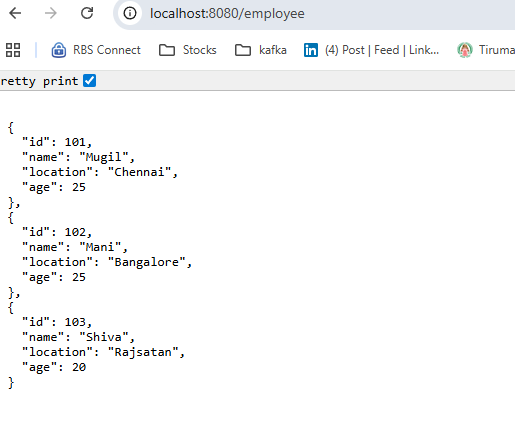
Spring Batch Reading from REST Endpoint
BatchConfig.java
@Configuration
public class BatchConfig {
    @Autowired
    RestItemReader restItemReader;

    @Autowired
    ItemWriter restFileWriter;

    @Autowired
    ItemProcessor simpleJobProcessor;

    @Bean
    public Job job(JobRepository jobRepository, PlatformTransactionManager transactionManager) {
        return new JobBuilder("job", jobRepository)
                .incrementer(new RunIdIncrementer())
                .start(simpleChunkStepRest(jobRepository, transactionManager))
                .build();
    }


    @Bean
    public Step simpleChunkStepRest(JobRepository jobRepository, PlatformTransactionManager transactionManager) {
        return new StepBuilder("Chunk Oriented Step", jobRepository)
                .<String, String>chunk(10, transactionManager)
                .reader(restItemReader)
                .processor(simpleJSONJobProcessor)
                .writer(restFileWriter)
                .build();
    }
}
Employee.java
@Getter
@Setter
@NoArgsConstructor
@AllArgsConstructor
@ToString
public class Employee {
    private Integer id;
    private String name;
    private String location;
    private Integer age;
}
SimpleJSONJobProcessor.java
@Component
public class SimpleJSONJobProcessor implements ItemProcessor<Employee, String> {
    @Override
    public String process(Employee item) throws Exception {
        System.out.println("Inside JSON Job Processor");

        String employeeDetails = "The Employee Name is " + item.getName() + ", his Age is " + item.getAge() + " and location is " + item.getLocation();

        return employeeDetails;
    }
}
RestItemReader.java
@Component
public class RestItemReader implements ItemReader {

    @Autowired
    EmployeeService employeeService;

    private List<Employee> arrEmployee;

    @Override
    public Employee read() throws Exception, UnexpectedInputException, ParseException, NonTransientResourceException {
        if(arrEmployee == null){
            arrEmployee = employeeService.getEmpList();
        }

        if(arrEmployee != null && !arrEmployee.isEmpty()){
            return arrEmployee.remove(0);
        }

        return null;
    }
}
EmployeeService.java
4
@Service
public class EmployeeService {
    List<Employee> arrEmp = null;

    public List<Employee> getEmpList(){
        RestTemplate restTemplate = new RestTemplate();

        Employee[] employeeArray = restTemplate.getForObject("http://localhost:8080/employee", Employee[].class);


        List<Employee> arrEmp = Arrays.stream(employeeArray)
                .collect(Collectors.toCollection(ArrayList::new));

        return arrEmp;
    }

    public Employee getEmployee(){
        if(arrEmp == null){
            getEmpList();
        }

        if(arrEmp != null && !arrEmp.isEmpty()){
            return getEmpList().remove(0);
        }
        return null;
    }
}
RestFileWriter.java
@Component
public class RestFileWriter implements ItemWriter<String> {
    @Override
    public void write(Chunk<? extends String> items) throws Exception {
        System.out.println("Inside Job Writer");
        items.getItems().forEach(System.out::println);
    }
}
Output
Inside JSON Job Processor
Inside JSON Job Processor
Inside JSON Job Processor
Inside Job Writer
The Employee Name is Mugil, his Age is 25 and location is Chennai
The Employee Name is Mani, his Age is 25 and location is Bangalore
The Employee Name is Shiva, his Age is 20 and location is Rajsatan
Triggering and Stopping Spring Batch Job from Rest Endpoints
To Stop the job from automatic run at the time of server start we should add the below property in application.properties
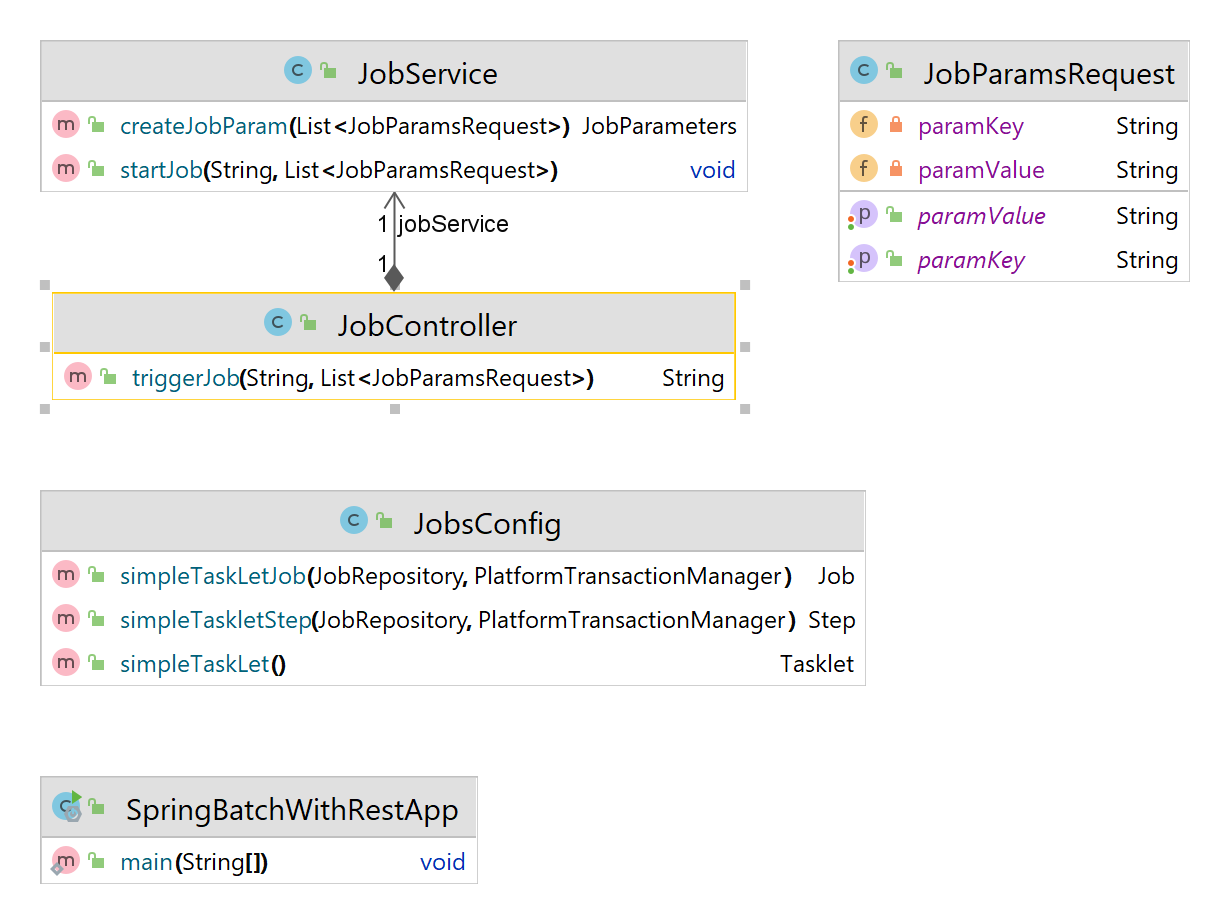
- Jobs would be created in JobsConfig.java and available as Bean
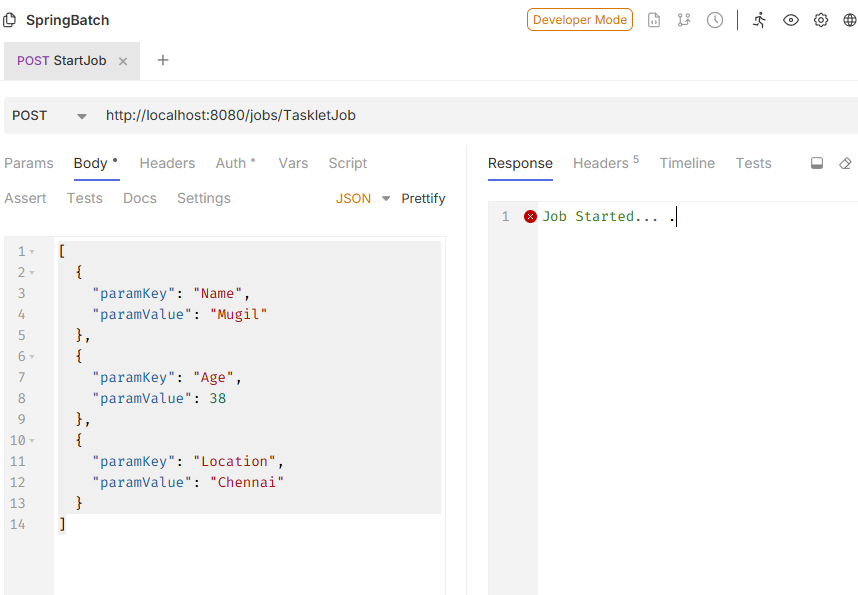
- JobService.java helps in launching the job. startJob method reads the json parameter and passed them as jobparameter to job
- JobController.java takes jobname as parameter along with json object in body
- JSON body contains JobParamsRequest datatype as argument
- @EnableAsync is a Spring annotation that activates asynchronous method execution in application. Spring starts scanning for methods annotated with @Async and runs them in separate threads, allowing your app to perform tasks without blocking the main thread
- @Async annotation is used over startJob in jobService.java
- createJobParam method uses builder method which builds job parameters
- JSON should be supplied with paramKey and paramValue
application.properties
.
.
spring.batch.job.enabled=false
.
.
json as in bruno
[
  {
    "paramKey": "Name",
    "paramValue": "Mugil"
  },
  {
    "paramKey": "Age",
    "paramValue": 38
  },
  {
    "paramKey": "Location",
    "paramValue": "Chennai"
  }
]
SpringBatchWithRestApp.java
@SpringBootApplication
@EnableBatchProcessing
@EnableAsync
public class SpringBatchWithRestApp {
	public static void main(String[] args) {
		SpringApplication.run(SpringBatchWithRestApp.class, args);
	}
}
JobController.java
@RestController
@RequestMapping("/jobs/")
public class JobController {

    @Autowired
    JobService jobService;

    @PostMapping("/{jobName}")
    public String triggerJob(@PathVariable String jobName, @RequestBody List<JobParamsRequest> jobParamsRequestList) throws Exception {
        jobService.startJob(jobName, jobParamsRequestList);
        return "Job Started... .";
    }
}
JobService.java
@Service
public class JobService {

    @Autowired
    JobLauncher jobLauncher;

    @Autowired
    Job simpleTaskLetJob;

    @Async
    public void startJob(String jobName, List<JobParamsRequest> jobParamsRequestList) throws Exception {
        JobExecution jobExecution = null;

        //Thread Added for Testing Async Behaviour
        Thread.sleep(3000);

        try {
            if(jobName.equals("TaskletJob")){
                jobExecution = jobLauncher.run(simpleTaskLetJob, createJobParam(jobParamsRequestList));
                System.out.println("Job Execution ID = " + jobExecution.getId());
            }else{
                System.out.println("Invalid Job Name");
            }
        } catch (Exception e) {
            System.out.println("Exception while starting job "+ e.getMessage());
        }
    }

    public JobParameters createJobParam(List<JobParamsRequest> arrRequset) {
        JobParametersBuilder jobParametersBuilder = new JobParametersBuilder();
        arrRequset.forEach(jobParamsRequest -> jobParametersBuilder
                                                    .addString(jobParamsRequest.getParamKey(), jobParamsRequest.getParamValue())
                                                    .addLong("time", System.currentTimeMillis()));
        return jobParametersBuilder.toJobParameters();
    }
}
JobParamsRequest.java
@Setter
@Getter
public class JobParamsRequest {
    private String paramKey;
    private String paramValue;
}
JobsConfig.java
@Configuration
public class JobsConfig {
    @Bean
    public Job simpleTaskLetJob(JobRepository jobRepository, PlatformTransactionManager transactionManager) {
        return new JobBuilder("job", jobRepository)
                .incrementer(new RunIdIncrementer())
                .start(simpleTaskletStep(jobRepository, transactionManager))
                .build();
    }

    @Bean
    public Step simpleTaskletStep(JobRepository jobRepository, PlatformTransactionManager transactionManager) {
        StepBuilder stepBuilderOne = new StepBuilder("Tasklet Oriented Step", jobRepository);
        return stepBuilderOne
                .tasklet(simpleTaskLet(), transactionManager)
                .build();
    }

    @Bean
    public Tasklet simpleTaskLet(){
        return (StepContribution contribution, ChunkContext chunkContext) -> {
            return RepeatStatus.FINISHED;
        };
    }
}
Output
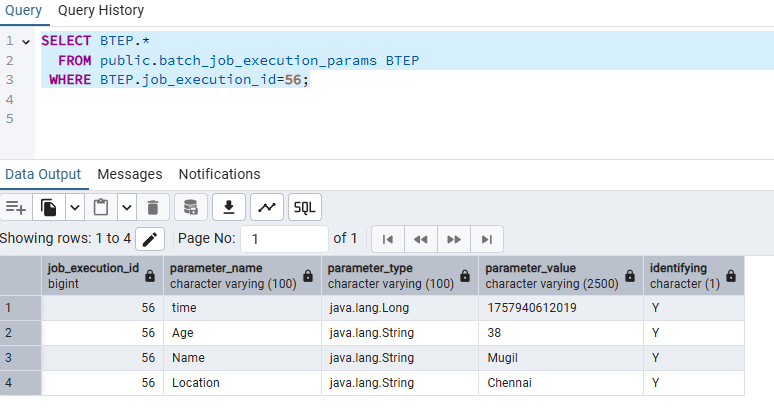
2025-09-15T18:20:12.052+05:30  INFO 25776 --- [FileChecker] [         task-1] o.s.b.c.l.s.TaskExecutorJobLauncher      : Job: [SimpleJob: [name=job]] launched with the following parameters: [{'time':'{value=1757940612019, type=class java.lang.Long, identifying=true}','Age':'{value=38, type=class java.lang.String, identifying=true}','Name':'{value=Mugil, type=class java.lang.String, identifying=true}','Location':'{value=Chennai, type=class java.lang.String, identifying=true}'}]
2025-09-15T18:20:12.063+05:30  INFO 25776 --- [FileChecker] [         task-1] o.s.batch.core.job.SimpleStepHandler     : Executing step: [Tasklet Oriented Step]
2025-09-15T18:20:12.068+05:30  INFO 25776 --- [FileChecker] [         task-1] o.s.batch.core.step.AbstractStep         : Step: [Tasklet Oriented Step] executed in 5ms
2025-09-15T18:20:12.071+05:30  INFO 25776 --- [FileChecker] [         task-1] o.s.b.c.l.s.TaskExecutorJobLauncher      : Job: [SimpleJob: [name=job]] completed with the following parameters: [{'time':'{value=1757940612019, type=class java.lang.Long, identifying=true}','Age':'{value=38, type=class java.lang.String, identifying=true}','Name':'{value=Mugil, type=class java.lang.String, identifying=true}','Location':'{value=Chennai, type=class java.lang.String, identifying=true}'}] and the following status: [COMPLETED] in 13ms
Job Execution ID = 56
Stopping Spring Batch Job
JobController.java
@RestController
@RequestMapping("/jobs")
public class JobController {

    @Autowired
    JobService jobService;

    @Autowired
    JobOperator jobOperator;

    @PostMapping("/start/{jobName}")
    public String triggerJob(@PathVariable String jobName, @RequestBody List<JobParamsRequest> jobParamsRequestList) throws Exception {
        jobService.startJob(jobName, jobParamsRequestList);
        return "Job Started... .";
    }


    @GetMapping("/stop/{jobExecutionId}")
    public String StopJob(@PathVariable Long jobExecutionId) throws Exception {
        jobOperator.stop(jobExecutionId);
        return "Job Stopped...";
    }
}
Note:
To Stop a running job, jobexecutionId should be passed as a parameter which could be fetched from batch_job_execution table in DB which has status as STARTED
Spring Batch – Interview Questions
Frequently Asked Questions
Job Execution vs Job Instance?
Job instance is like blueprint. Job Execution is actual job.
Job instance is Unique by Job Name + Parameters
Job Execution need not be Unique incase of failed Execution
Why Job Instance should be Unique?
Spring Batch uses job name + parameters to identify a job instance. This prevents accidental duplicate processing—especially important in financial, ETL, or reporting systems. If you try to run the same job with the same parameters again – Spring Batch sees that the Job Instance already completed.- It prevents re-execution to avoid duplicate processing or unintended side effects (e.g., writing the same data twice).
Why Job Execution may not be Unique?
If a job execution fails, you can restart it with the same parameters. Spring Batch will:
- Reuse the same job instance
- Create a new job execution
- Resume from where it left off (if configured
Let’s say you run a job called “dataImportJob” with parameters {file=data.csv}:
- ❌First run Fails → JobInstance ID = 101, JobExecution ID = 201
- ✅You retry → JobExecution ID = 202 (still linked to JobInstance ID = 101)
- ✅You run with {file=data_v2.csv} → New JobInstance ID = 102, JobExecution ID = 203
So: JobInstance 101 → has executions 201 and 202, JobInstance 102 → has execution 203
Why This Matters
- You can track retries and failures per job instance.
- You can restart a failed job execution without creating a new instance.
- You can query historical runs by instance or execution ID.
How Job Instance and Execution are Stored in DB?
JobInstance, JobExecution, JobParameters, and StepExecution map to BATCH_JOB_INSTANCE, BATCH_JOB_EXECUTION, BATCH_JOB_EXECUTION_PARAMS, and BATCH_STEP_EXECUTION respectively
BATCH_JOB_EXECUTION_PARAMS table always refers parameters at Job Execution Level rather than Job Instance Level. This is done so each execution can retain a complete and independent record of the inputs used—even if those parameters are the same across multiple executions of the same job instance. Though the identity of a job instance is based on its parameters storing them only at the instance level would create a few limitations.
Executions wouldn’t have their own copy of parameters, making it harder to audit or debug individual runsRetries or restarts would have no way to track what parameters were used during each attempt.Execution-level metadata (like timestamps, exit codes, and logs) would be disconnected from the parameters that triggered them.
Difference between Tasklet Step and Chunk Oriented Step?
Tasklet – Executes one discrete action (e.g., delete a file, call a stored procedure) and ideal for non-repetitive tasks. I.E. File cleanup, Sending emails, Running shell scripts, Database maintenance
Chunk – processing is designed for handling large datasets by breaking them into manageable pieces.Uses ItemReader, ItemProcessor, and ItemWriter.Commits after processing a defined number of items. I.E. Reading from a database or file and writing to another source, High-volume data processing
If you’re building a job that just needs to do one thing—like clean up a directory—go with a Tasklet. If you’re processing thousands of records, Chunk-Oriented is your best bet.
JobConfig.java
    .
    .
    .
    @Bean
    public Job job(JobRepository jobRepository, PlatformTransactionManager transactionManager) {
        return new JobBuilder("job", jobRepository)
                .incrementer(new RunIdIncrementer())
                .start(simpleTaskletStep(jobRepository, transactionManager))
                .next(simpleChunkStep(jobRepository, transactionManager))
                .build();
    }

    @Bean
    public Step simpleTaskletStep(JobRepository jobRepository, PlatformTransactionManager transactionManager) {
        StepBuilder stepBuilderOne = new StepBuilder("Tasklet Oriented Step", jobRepository);
        return stepBuilderOne
                .tasklet(simpleTaskLet(), transactionManager)
                .build();
    }

    @Bean
    public Tasklet simpleTaskLet(){
        return (StepContribution contribution, ChunkContext chunkContext) -> {
            return RepeatStatus.FINISHED;
        };
    }

    @Bean
    public Step simpleChunkStep(JobRepository jobRepository, PlatformTransactionManager transactionManager) {
        StepBuilder stepBuilderOne = new StepBuilder("Chunk Oriented Step", jobRepository);
        return stepBuilderOne
                .chunk(3, transactionManager)
                .reader(simpleJobReader)
                .processor(simpleJobProcessor)
                .writer(simpleJobWriter)
                .build();
    }
Difference between ItemReader and ItemWriter?
ItemReader reads one item at a time and called repeatedly until it returns null, signaling no more data. ItemWriter Writes a list of processed items to a destination (like a file, database, or message queue) and it is called once per chunk with a list of items.
🔄 ItemReader brings the ingredients to the kitchen,
🧑🍳 ItemProcessor cooks them,
📦 ItemWriter packs and delivers the final dish
Why ItemReader reads each row one after another whereas ItemWriter writes in chunk?
ItemReader is to process each item individually—transforming, validating, or enriching it—before it’s added to a chunk for writing whereas ItemWriter on other hand writes in bulk as it is faster and reduces overhead—especially for I/O operations like database inserts or file writes.
How to prevent spring batch jobs run on start?
.
.
spring.batch.job.enabled=false
.
.
Using Simple ItemReader, ItemProcessor and ItemWriter
How it Works
- We can define the Size of Jobreader and Job Processor. In other words the no of records to be processed could be set using Jobreader and job processor
- We dont have control over Jobwriter. Jobreader and JobProcessor honors chunk size
SimpleJobReader.java
import org.springframework.batch.item.ItemReader;
import org.springframework.batch.item.NonTransientResourceException;
import org.springframework.batch.item.ParseException;
import org.springframework.batch.item.UnexpectedInputException;
import org.springframework.stereotype.Component;
import java.util.Arrays;
import java.util.List;

@Component
public class SimpleJobReader implements ItemReader<Integer> {
    List<Integer> arrNum = Arrays.asList(1,2,3,4,5,6,7,8,9);
    int chunkSize = 3;
    int index = 0;

    @Override
    public Integer read() throws Exception, UnexpectedInputException, ParseException, NonTransientResourceException {
        System.out.println("Inside Job Reader");
        if(index < arrNum.size()){
            int num = arrNum.get(index);
            index++;
            return num;
        }
        index = 0;

        return null;
    }
}
SimpleJobProcessor.java
import org.springframework.batch.item.ItemProcessor;
import org.springframework.stereotype.Component;

@Component
public class SimpleJobProcessor implements ItemProcessor<Integer, Long> {
    @Override
    public Long process(Integer item) throws Exception {
        System.out.println("Inside Job Processor");
        return Long.valueOf(item);
    }
}
SimpleJobWriter.java
import org.springframework.batch.item.Chunk;
import org.springframework.batch.item.ItemWriter;
import org.springframework.stereotype.Component;

@Component
public class SimpleJobWriter implements ItemWriter<Long> {
    @Override
    public void write(Chunk<? extends Long> items) throws Exception {
        System.out.println("Inside Job Writer");
        items.getItems().forEach(System.out::println);
    }
}
SimpleJobWriter.java
@Configuration
public class BatchConfig {
    @Autowired
    ItemReader simpleJobReader;

    @Autowired
    ItemWriter simpleJobWriter;

    @Autowired
    ItemProcessor simpleJobProcessor;

    @Bean
    public Job job(JobRepository jobRepository, PlatformTransactionManager transactionManager) {
        return new JobBuilder("job", jobRepository)
                .incrementer(new RunIdIncrementer())
                .start(simpleTaskletStep(jobRepository, transactionManager))
                .next(simpleChunkStep(jobRepository, transactionManager))
                .build();
    }

    @Bean
    public Step simpleChunkStep(JobRepository jobRepository, PlatformTransactionManager transactionManager) {
        StepBuilder stepBuilderOne = new StepBuilder("Chunk Oriented Step", jobRepository);
        return stepBuilderOne
                .chunk(3, transactionManager)
                .reader(simpleJobReader)
                .processor(simpleJobProcessor)
                .writer(simpleJobWriter)
                .build();
    }

    @Bean
    public Step simpleTaskletStep(JobRepository jobRepository, PlatformTransactionManager transactionManager) {
        StepBuilder stepBuilderOne = new StepBuilder("Tasklet Oriented Step", jobRepository);
        return stepBuilderOne
                .tasklet(simpleTaskLet(), transactionManager)
                .build();
    }

    @Bean
    public Tasklet simpleTaskLet(){
        return (StepContribution contribution, ChunkContext chunkContext) -> {
            return RepeatStatus.FINISHED;
        };
    }
}
Output
Inside Job Reader
Inside Job Reader
Inside Job Reader
Inside Job Processor
Inside Job Processor
Inside Job Processor
Inside Job Writer
1
2
3
Inside Job Reader
Inside Job Reader
Inside Job Reader
Inside Job Processor
Inside Job Processor
Inside Job Processor
Inside Job Writer
4
5
6
Inside Job Reader
Inside Job Reader
Inside Job Reader
Inside Job Processor
Inside Job Processor
Inside Job Processor
Inside Job Writer
7
8
9
Inside Job Reader
Job Listener vs Step Listener
Use a JobListener for logic that needs to run once at the beginning or end of an entire batch job, such as setting up or tearing down resources used by multiple steps. Use a StepListener for logic that needs to run before and after a specific step completes, like writing a footer to a file after a data loading step or handling errors that occur within that particular step.
Use a JobListener for logic that needs to run once at the beginning or end of an entire batch job, such as setting up or tearing down resources used by multiple steps. Use a StepListener for logic that needs to run before and after a specific step completes, like writing a footer to a file after a data loading step or handling errors that occur within that particular step.
Use a JobListener for:
Pre-job initialization:
Tasks like initializing connection pools, starting a timer for the entire job, or setting up a shared context that all steps will use.
Post-job cleanup:
Tasks like cleaning up temporary files, sending summary reports, or releasing shared resources after the job has finished.
Overall job status logging:
Capturing the overall start and end times of the entire batch process.
Use a StepListener (specifically StepExecutionListener) for:
Step-specific setup:
Any setup required only before a particular step starts, like preparing a file for writing only within that step.
Step-specific teardown:
Cleanup tasks that are unique to a step, such as writing a footer to a flat file after a step has processed its items.
Step-level error handling:
Catching or logging errors that occur specifically within a single step.
Interacting with the StepContext:
Modifying or reading data from the context that is specific to a single step’s execution.
SimpleJobListener.java
import org.springframework.batch.core.JobExecution;
import org.springframework.batch.core.JobExecutionListener;
import org.springframework.stereotype.Component;

@Component
public class SimpleJobListener implements JobExecutionListener {

    @Override
    public void beforeJob(JobExecution jobExecution){
        System.out.println("Before Job Starts - "+ jobExecution.getJobInstance().getJobName());
        System.out.println("Job Params - "+ jobExecution.getJobParameters());
        System.out.println("Execution Contenxt- "+ jobExecution.getExecutionContext());
        jobExecution.getExecutionContext().put("Name", "Mugil");
    }

    @Override
    public void afterJob(JobExecution jobExecution){
        System.out.println("After Job Ends - "+ jobExecution.getJobInstance().getJobName());
        System.out.println("Job Params - "+ jobExecution.getJobParameters());
        System.out.println("Execution Contenxt- "+ jobExecution.getExecutionContext());
    }
}
SimpleStepListener.java
import org.springframework.batch.core.ExitStatus;
import org.springframework.batch.core.StepExecution;
import org.springframework.batch.core.StepExecutionListener;
import org.springframework.stereotype.Component;

@Component
public class SimpleStepListener implements StepExecutionListener {
    @Override
    public void beforeStep(StepExecution stepExecution){
        System.out.println("Before Step Run " + stepExecution.getStepName());
        System.out.println("Job Context " + stepExecution.getJobExecution().getExecutionContext());
        System.out.println("Step Context " + stepExecution.getExecutionContext());
        stepExecution.getExecutionContext().put("Name", "Vannan");
    }

    @Override
    public ExitStatus afterStep(StepExecution stepExecution){
        System.out.println("After Step Run " + stepExecution.getStepName());
        System.out.println("Job Context " + stepExecution.getJobExecution().getExecutionContext());
        System.out.println("Step Context " + stepExecution.getExecutionContext());
        return ExitStatus.COMPLETED;
    }
}
Execution Context in Spring Batch
Job Execution Context and Step Execution Context
Job Execution Context – Available throughout the entire job execution across various steps. Stores data that needs to be shared across multiple steps or retrieved after a job restart. it survives restarts and failures.
I.E.
If you download a file in Step 1 and need its path in Step 3, store the path in the Job Execution Context.
Step Execution Context – Limited to the specific step execution.Stores data relevant only to that step, such as reader/writer state or counters.
I.E.
A reader might store the last read line number here so it can resume from that point if the step fails. We can pass values between steps and jobs using ExecutionContextPromotionListener.
BatchConfig.java
@Configuration
@EnableBatchProcessing
public class BatchConfig {

    @Autowired
    private JobBuilderFactory jobBuilderFactory;

    @Autowired
    private StepBuilderFactory stepBuilderFactory;

    @Bean
    public Job sampleJob() {
        return jobBuilderFactory.get("sampleJob")
            .start(step1())
            .next(step2())
            .listener(promotionListener()) // Promote data from step to job context
            .build();
    }

    @Bean
    public Step step1() {
        return stepBuilderFactory.get("step1")
            .tasklet((contribution, chunkContext) -> {
                StepExecution stepExecution = contribution.getStepExecution();
                stepExecution.getExecutionContext().putString("stepData", "Hello from Step 1");
                return RepeatStatus.FINISHED;
            })
            .build();
    }

    @Bean
    public Step step2() {
        return stepBuilderFactory.get("step2")
            .tasklet((contribution, chunkContext) -> {
                JobExecution jobExecution = contribution.getStepExecution().getJobExecution();
                String data = jobExecution.getExecutionContext().getString("stepData");
                System.out.println("Retrieved from Job Execution Context: " + data);
                return RepeatStatus.FINISHED;
            })
            .build();
    }

    @Bean
    public ExecutionContextPromotionListener promotionListener() {
        ExecutionContextPromotionListener listener = new ExecutionContextPromotionListener();
        listener.setKeys(new String[] { "stepData" }); // Promote this key from step to job
        return listener;
    }
}
Output
Retrieved from Job Execution Context: Hello from Step 1