import java.util.HashMap;
import java.util.Map;

public class LRUCache {
static DLLNode head;
static DLLNode tail;
Map hmDictionary = new HashMap();

public DLLNode searchCache(DLLNode dllNode){
return hmDictionary.get(dllNode.val);
}

//Check if the cache size has been exhausted, if so remove the element from map
public void addToCache(DLLNode dllNode){
if(hmDictionary.get(dllNode.val) == null){
hmDictionary.put(dllNode.val, dllNode);
}else{
dllNode.prev.next = dllNode.next;
dllNode.next = LRUCache.tail;
LRUCache.tail.prev = dllNode;
}

if(hmDictionary)
}

public void removeFromCache(DLLNode dllNode){
if(hmDictionary.get(dllNode.val) != null){
hmDictionary.remove(dllNode.val);
}
}

}
public class DLLNode {
DLLNode prev;
DLLNode next;

Integer val;
}

Remove Nth Node from Linked List

Remove 3rd node from below list
Input

Anbu -> Arul -> Arasu-> Bharath-> Catherine -> Davidson

Output

Anbu -> Arul -> Bharath-> Catherine -> Davidson

Idea: Traverse to the Kth Position and point the reference of temp to one next to it. We need to handle one edge case which is when the Kth position is first node then in such case the head should be changed to point temp next position.

public class RemoveNthNodeFromLL {
    public static void main(String[] args) {
        SimpleLinkedList simpleLinkedList = new SimpleLinkedList();

        simpleLinkedList.insertNodeAtEnd("Anbu");
        simpleLinkedList.insertNodeAtEnd("Arul");
        simpleLinkedList.insertNodeAtEnd("Arasu");
        simpleLinkedList.insertNodeAtEnd("Bharath");
        simpleLinkedList.insertNodeAtEnd("Catherine");
        simpleLinkedList.insertNodeAtEnd("Davidson");

        simpleLinkedList.printLinkedList();

        System.out.println("--------------After Removing 3rd Node--------------");

        removeNthNode(simpleLinkedList, 3);

        simpleLinkedList.printLinkedList();
    }


     public static void removeNthNode(SimpleLinkedList simpleLinkedList, Integer indexOfNodeToBeRemoved){
        Node temp = simpleLinkedList.head;

        //Edgecase1 : If Kth index is 1
        if(indexOfNodeToBeRemoved == 1){
            simpleLinkedList.head = temp.next;
            return;
        }

        for(int idx=1;idx<indexOfNodeToBeRemoved-1;idx++){
            temp = temp.next;
        }

        temp.next = temp.next.next;
    }
}

Output

Anbu
Arul
Arasu
Bharath
Catherine
Davidson
--------------After Removing 3rd Node--------------
Anbu
Arul
Bharath
Catherine
Davidson

Reverse a Linked List
Input

1 -> 2 -> 3 -> 4 -> 5 -> NULL 

Output

5 -> 4 -> 3 -> 2 -> 1 -> NULL 

Idea1: Using bruteforce copy the list in to Array and traverse the array backward and create new node
Idea2:

  1. Use 3 Variables. Prev, Curr, Temp and traverse through list items
  2. Start with Curr in Head and Prev as null
  3. Move forward by making Temp to Curr.next, Curr.next to Prev
  4. Prev should be set to Curr and Curr should be set to Temp

Refer Adv DSA 3 Note 5 Page 9

Previous -> Current -> Temp

Node.java

package com.mugil.org;
class Node{
	String content;
	Node next;
	Node head;
    public Node(String content){
	 this.content = content;
	}	
}

SimpleLinkedList.java

package com.mugil.org;

public class SimpleLinkedList {
    Node head;

    public void printLinkedList() {
        Node current = head;
        while (current != null) {
            System.out.println(current.content);
            current = current.next;
        }
    }
}

ReverseLinkedList.java

public class ReverseLinkedList {
    public static void main(String[] args) {
        SimpleLinkedList simpleLinkedList = new SimpleLinkedList();

        simpleLinkedList.insertNodeAtEnd("Anbu");
        simpleLinkedList.insertNodeAtEnd("Arul");
        simpleLinkedList.insertNodeAtEnd("Arasu");
        simpleLinkedList.insertNodeAtEnd("Bharath");
        simpleLinkedList.insertNodeAtEnd("Catherine");
        simpleLinkedList.insertNodeAtEnd("Davidson");

        simpleLinkedList.printLinkedList();

        reverseLinkedList(simpleLinkedList);
    }

    public static void reverseLinkedList(SimpleLinkedList simpleLinkedList){
        Node temp = simpleLinkedList.head;
        Node curr = temp;
        Node prev = null;


        while(temp != null){
            temp = curr.next;
            curr.next = prev;
            prev = curr;
            curr = temp;
        }

        simpleLinkedList.head = prev;

        System.out.println("-----------------------------------");
        simpleLinkedList.printLinkedList();
    }
}

Output

Anbu
Arul
Arasu
Bharath
Catherine
Davidson
-----------------------------------
Davidson
Catherine
Bharath
Arasu
Arul
Anbu
  1. Linked List is made of combination of Node
  2. The smallest unit of linked list is Node
  3. Node contains two things the content of the node And reference to next node
  4. If a linked list has only one element then it would have only one node

Node.java

class Node{
	String content;
	Node next;

        public Node(String content){
 	 this.content = content;
	}	
}
  1. To traverse linked list we should always start at the head
  2. After printing the content we should move to next node as mentioned in next variable in current node

Traversing a LL
LL node next always points to reference of next node if any or else would be null if only one element is present. While Traversing we always start with head position

public class Main{
	public static void main(String args[]){
		Node node1 = new Node("Anbu");
				
		Node node2 = new Node("Arul");
		node1.next = node2;

		Node node3 = new Node("Arasu");
		node2.next = node3;

		printLinkedList(node1);
	}

	public static void printLinkedList(Node startingNode){
		while(startingNode.next !=null){
			System.out.println(startingNode.content);
			startingNode = startingNode.next;
		}

		if(startingNode.next == null){
			System.out.println(startingNode.content);
		}
	}
}

The above code can be refactored as below using recursion calling same function again and again

public class Main{
	public static void main(String args[]){
		Node node1 = new Node("Anbu");
				
		Node node2 = new Node("Arul");
		node1.next = node2;

		Node node3 = new Node("Arasu");
		node2.next = node3;

		printLinkedList(node1.head);
	}
        
        public static void printLinkedList(Node startingNode){
		//Note: We are traversing to next null node before exit without this last element wont be printed
		if(startingNode == null){ 			
		  return;
		}

		System.out.println(startingNode.content);
		printLinkedList(startingNode.next);
	}
}

Output

Anbu
Arul
Arasu

Now let’s move the linked list methods to a separate class called SimpleLinkedList.java

SimpleLinkedList.java

public class SimpleLinkedList {
    Node head;

    public static void traverseLinkedList(Node startingNode){
        //Note: We are traversing to next null node before exit without this last element wont be printed
        if(startingNode == null){
            return;
        }

        System.out.println(startingNode.content);
        printLinkedList(startingNode.next);
    }
}

Smoke Testing vs Load Testing vs Stress Testing vs Spike Testing vs Soak Testing
Smoke Testing: A preliminary test to ensure the most important functions of an application work correctly. The term originated in hardware and electronics: engineers would power on a new circuit or device, and if it literally started smoking, they knew something was fundamentally wrong

Why Smoke Testing: Prevents wasting time on deeper tests when the basic functionality is already broken. Test Basic Functional Requirements are met. I.E. Can you log in, view your balance, and make a simple transaction

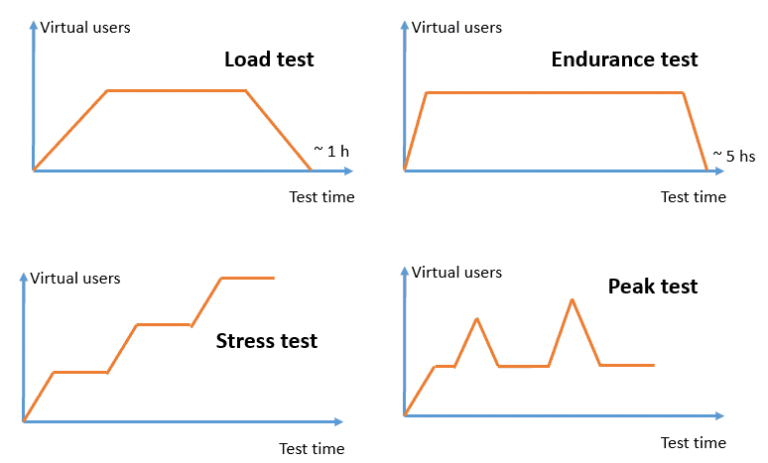
Load Testing: Must simulate realistic traffic patterns. The goal of load testing is to verify that a system can handle expected user traffic and workload without performance degradation, downtime, or failures. It ensures reliability, responsiveness, and stability under real-world usage conditions.

During normal days, it handles ~10,000 users.A load test simulates this traffic to check if pages load quickly, payments process smoothly, and servers remain stable.If response times spike or errors occur, developers know where to optimize.

Load testing is like a rehearsal for your application for normal day traffic

Stress Testing:The goal of stress testing is to evaluate how a system behaves under extreme or abnormal conditions—pushing it beyond its normal operating limits to identify breaking points, bottlenecks, and ensure the system fails gracefully rather than catastrophically.

Stress testing is about resilience. It ensures that when systems face extreme, unexpected loads, they don’t collapse outright but instead degrade gracefully, recover quickly, and protect data integrity.

Stress testing is like a rehearsal for your application for maximum capacity before performance collapses.

Soak Testing(Endurance Test):The goal of a soak test (also called endurance testing) is to verify that a system can handle a sustained workload over an extended period of time without performance degradation, resource leaks, or failures.

Soak testing is about endurance. It ensures that your system doesn’t just work well in the short term but remains stable, efficient, and reliable over extended periods of continuous use

Long-running tests reveal issues like memory leaks, file handle leaks, or database connection leaks that don’t show up in short tests.

Spike Testing:The goal is to evaluate how a system reacts to sudden, extreme increases (or decreases) in load. It checks whether the system can handle abrupt traffic surges, recover quickly, and remain stable without crashing or degrading severely.

Soak testing is about endurance. It ensures that your system doesn’t just work well in the short term but remains stable, efficient, and reliable over extended periods of continuous use

Reveals bottlenecks in servers, databases, or network components that only appear during sudden surges. validate Scalability & Elasticity

Sanity Testing: Sanity Testing is narrow, deep, correctness check of specific functionality whereas smoke test is to verify that the basic, critical functionalities of a build work before deeper testing. road and shallow – covers major features at a high level.

Below Script sends GET request once. It creates a single Virtual User(VU) and sends the get request.

import http from 'k6/http';
import { check } from 'k6';

export default function () {
  // Target URL
  let res = http.get('https://httpbin.test.k6.io/get');

  // Basic check to ensure status is 200
  check(res, {
    'status is 200': (r) => r.status === 200,
  });

  // Print response body to console
  //console.log(res.body);
}
k6 run test.js

To make the same script run for a duration. In this case the number of iterations varies based on how fast the request is completed based on keeping user constant 1(VU).

k6 run test.js --duration 5s

To make the same script run for a iteration. In this case the number of iterations would be 5 and VU is 1.

k6 run test.js --iterations 5

Below Script sends GET request and sleeps for 1 second. So if we run the test for 5 seconds then we run 4 request by same user

import http from 'k6/http';
import { check } from 'k6';
import { sleep } from 'k6';

export default function () {
  // Target URL
  let res = http.get('https://httpbin.test.k6.io/get');
  sleep(1);

  // Basic check to ensure status is 200
  check(res, {
    'status is 200': (r) => r.status === 200,
  });

  // Print response body to console
  //console.log(res.body);
}

To make the same script run for a 10 iteration and 10 VUs.

k6 run test.js -i 10 -u 10

Instead of supplying in command argument we can do the same thing by defining in constant as below

import http from 'k6/http';
import { check } from 'k6';

export const options = {
  vus: 10,          // fixed number of VUs
  iterations: 10  // each VU loops for 30 seconds
};

export default function () {
  let res = http.get('https://httpbin.test.k6.io/get');


  check(res, {
    'status is 200': (r) => r.status === 200,
  });

  //console.log(res.body);
}

Simple Shedlock Code

pom.xml

	<dependency>
			<groupId>net.javacrumbs.shedlock</groupId>
			<artifactId>shedlock-spring</artifactId>
			<version>5.13.0</version>
		</dependency>
		<dependency>
			<groupId>net.javacrumbs.shedlock</groupId>
			<artifactId>shedlock-provider-jdbc-template</artifactId>
			<version>5.13.0</version>
		</dependency>

ShedLockConfig.java

import net.javacrumbs.shedlock.core.LockProvider;
import net.javacrumbs.shedlock.provider.jdbctemplate.JdbcTemplateLockProvider;
import org.springframework.context.annotation.Bean;
import org.springframework.context.annotation.Configuration;
import org.springframework.jdbc.core.JdbcTemplate;

import javax.sql.DataSource;

@Configuration
public class ShedLockConfig {

    @Bean
    public LockProvider lockProvider(DataSource dataSource) {
        return new JdbcTemplateLockProvider(
                JdbcTemplateLockProvider.Configuration.builder()
                        .withJdbcTemplate(new JdbcTemplate(dataSource))
                        .withTableName("empmgmt.shedlock")
                        .build()

        );
    }
}

ShedlockDemoApplication.java

import net.javacrumbs.shedlock.spring.annotation.EnableSchedulerLock;
import org.springframework.boot.SpringApplication;
import org.springframework.boot.autoconfigure.SpringBootApplication;
import org.springframework.scheduling.annotation.EnableScheduling;

@SpringBootApplication
@EnableScheduling
@EnableSchedulerLock(defaultLockAtMostFor = "PT4M")
public class ShedlockDemoApplication {
    public static void main(String[] args) {
        SpringApplication.run(ShedlockDemoApplication.class, args);
    }
}

PostFetchScheduler.java
fetchPosts method is called every minute

@Component
class PostFetchScheduler {

    final PostFetchService postFetchService;

    PostFetchScheduler(PostFetchService postFetchService) {
        this.postFetchService = postFetchService;
    }

    @Scheduled(cron = "0 */1 * ? * *")
    @SchedulerLock(name = "fetchPosts", lockAtMostFor = "PT2M", lockAtLeastFor = "PT1M")
    void fetchPosts() {
        postFetchService.fetchPosts();
    }
}

How to run the code

  1. Shedlock table should be created manually in database
      CREATE TABLE shedlock (
        name VARCHAR(64) NOT NULL,         -- lock name
        lock_until TIMESTAMP NOT NULL,     -- time until lock is valid
        locked_at TIMESTAMP NOT NULL,      -- time when lock was acquired
        locked_by VARCHAR(255) NOT NULL,   -- identifier of the node that holds the lock
        PRIMARY KEY (name)
    );
      
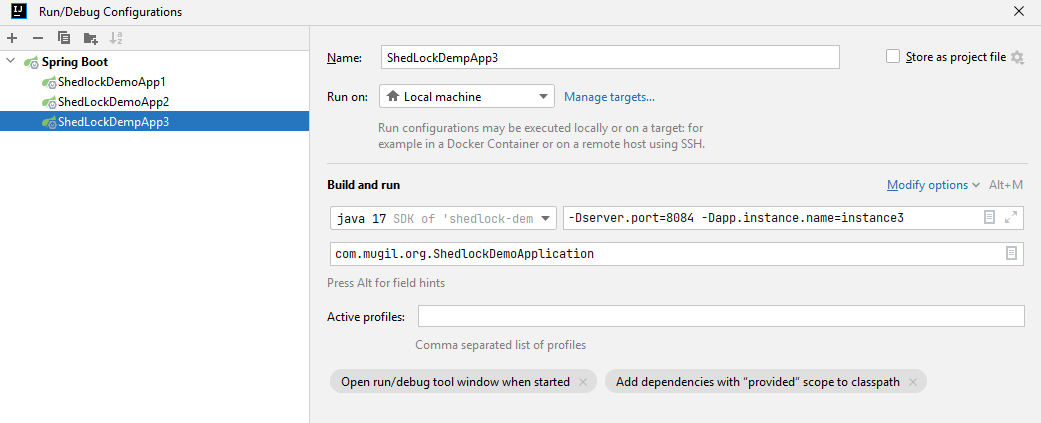
  2. Start multiple instance by supplying server.port and instance name as parameter
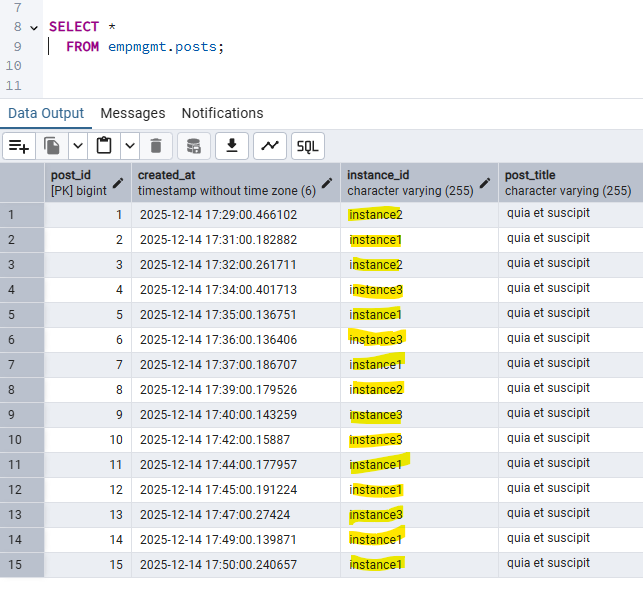
  3. First instance would create table in DB for posts for code in repo

Output

FAQ
Why we are defining lock timing at 2 places?

@EnableSchedulerLock(defaultLockAtMostFor = "PT4M") 
 

vs

  @SchedulerLock(name = "fetchPosts", lockAtMostFor = "PT2M", lockAtLeastFor = "PT1M")
 

@EnableSchedulerLock sets defaults for all tasks. A fallback setting for all tasks.

@SchedulerLock gives per-task overrides with more precise control. Fine-grained control, overriding the default for specific jobs.

Repo Link

Why to use Liquibase?
Liquibase simplifies – Database Version Control and Automation of Database Migrations

pom.xml

<dependency>
   <groupId>org.liquibase</groupId>
   <artifactId>liquibase-core</artifactId>
</dependency>

Simple Liquibase Script Example?
db.changelog-master.xml

<?xml version="1.0" encoding="UTF-8"?>
<databaseChangeLog
        xmlns="http://www.liquibase.org/xml/ns/dbchangelog"
        xmlns:xsi="http://www.w3.org/2001/XMLSchema-instance"
        xsi:schemaLocation="http://www.liquibase.org/xml/ns/dbchangelog
        http://www.liquibase.org/xml/ns/dbchangelog/dbchangelog-4.15.xsd">
    <include file="/db/changelog/1-createtable-changeset.xml"/>
    <include file="/db/changelog/2-altertable-changeset.xml"/>
    <include file="/db/changelog/3-inserttable-changeset.xml"/>
    <include file="/db/changelog/4-storedprocedure-changeset.xml"/>
    <include file="/db/changelog/5-createtable-address-changeset.xml"/>
</databaseChangeLog>

1-createtable-changeset.xml

<databaseChangeLog
        xmlns="http://www.liquibase.org/xml/ns/dbchangelog"
        xmlns:xsi="http://www.w3.org/2001/XMLSchema-instance"
        xsi:schemaLocation="http://www.liquibase.org/xml/ns/dbchangelog
        http://www.liquibase.org/xml/ns/dbchangelog/dbchangelog-4.15.xsd">

    <!-- Create schema -->
    <changeSet id="create-table" author="mugil">
        <createTable tableName="employee" schemaName="empmgmt">
            <column name="id" type="INT" autoIncrement="true">
                <constraints primaryKey="true" nullable="false"/>
            </column>
            <column name="emp_name" type="VARCHAR(50)"/>
        </createTable>
    </changeSet>
</databaseChangeLog>

Does the whole script runs everytime in liquibase?
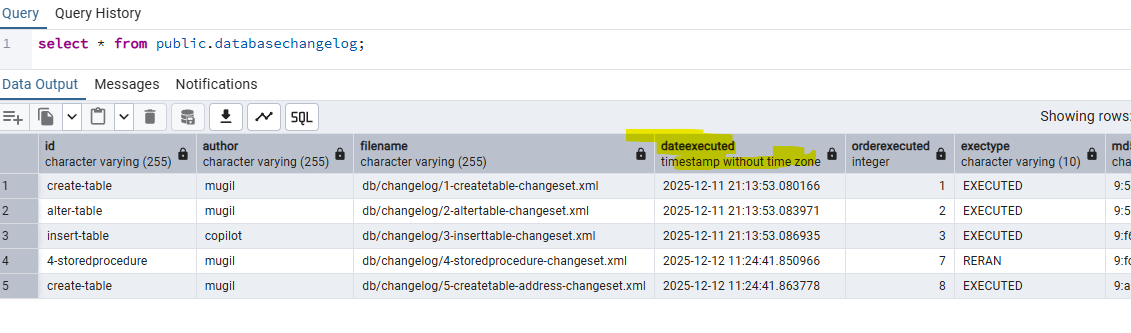
No. liquibase does not run the whole script all the time. liquibase maintains a databasechangelog table internally. This table keeps track of the new scripts and already executed scripts in form of history table.

How liquibase distinguish between script which is already executed and script which needs to be executed?
liquibase ID, Author and Chanelog file name to uniquely generate a MD5 Checksum value. This unique value helps in distinguish between old script which is already executed a new script to be executed


Is there a way I could run the script again in liquibase?
Yes. There is a way by deleting the MD5sum value in the database which makes the liquibase engine to run script again. You can also delete all the rows in the liquibase change log table which makes the script to get executed one more time.

Is there a way to confirm changelog files executed when the application starts?
2 Ways

You can confirm from server log displayed at the time of server startup.

You can also confirm from database change log table

How to run a script again and again in liquibase?
By using runAlways=”true” in changeset. Liquibase ignores the DATABASECHANGELOG execution history for that changeset. Every run applies the SQL, even if identical.

<changeSet id="insert_seed_data" author="dev" runAlways="true">
    <insert tableName="config">
        <column name="key" value="last_updated"/>
        <column name="value" value="NOW()"/>
    </insert>
</changeSet>

When to use runOnChange parameter in changeset?
If you are making changes to view or stored procedure then use runOnChange set to true. Liquibase ignores the DATABASECHANGELOG execution history for that changeset. Every run applies the SQL, even if identical.

When to use runOnChange parameter in changeset?
If you are making changes to view or stored procedure then use runOnChange set to true. Liquibase ignores the DATABASECHANGELOG execution history for that changeset. Every run applies the SQL, even if identical.

Other Notes:
You can confirm scripts that would be executed by using liquibase:updateSQL which generates list of scripts to be executed.

Code Repo

Why Shedlock?
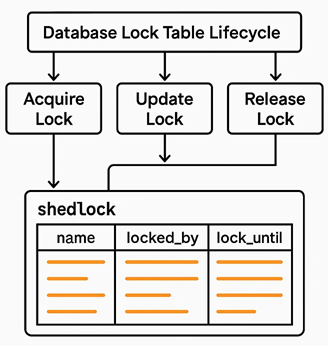
Shedlock prevents concurrent execution of scheduled tasks in distributed systems. In a server where multiple instance of same JAR running, shedlock prevents simultaneous execution of task by different instance at the same time. By this shedlock prevents race conditions and prevents multiple nodes from executing the same task simultaneously, which can lead to data corruption or duplication

Before Shedlock

Application Schedule Job
└─▶ PCF Inst A: tries to gets lock → runs job
└─▶ PCF Inst B: tries to gets lock → runs job
└─▶ PCF Inst C: tries to gets lock → runs job

Post Shedlock

Application Schedule Job
└─▶ PCF Inst A: tries to gets lock → runs job
└─▶ PCF Inst B: Waits for lock release → runs job
└─▶ PCF Inst C: Waits for lock release → runs job

When to use Shedlock?
If you have same scheduled job running in more than one instance.

How Shedlock Works?

  1. When a scheduled task is triggered, ShedLock checks a shared lock (e.g., in a database table).
  2. If the lock is free, it acquires it and runs the task.
  3. If another instance already holds the lock, the task is skipped.
  4. The lock has an expiration time to handle crashes or failures gracefully.

Use cases
Sending emails or notifications, Generating reports, Cleaning up expired sessions or data, Syncing data with external systems

FAQ
atLeast and atMost Lock time in shedlock?
In ShedLock, atLeast and atMost are parameters used to control the duration of the lock for scheduled tasks. They help ensure that tasks are executed safely and efficiently in distributed environments.

Example:

atLeast = 5m means the lock will stay held for at least 5 minutes, even if the task finishes in 1 minute. this prevents other instances from immediately picking up the task again, useful for throttling or spacing out executions.

atMost = 10m means the lock will automatically release after 10 minutes, even if the task hasn’t finished. atMost is needed incase the task fails and to prevent resource from holding for long time.

The @SchedulerLock annotation in ShedLock is used to control distributed locking for scheduled tasks

@Scheduled(cron = "0 0 * * * *") // every hour
@SchedulerLock(name = "hourlyTask", atLeast = "30m", atMost = "1h")
public void hourlyTask() {
    // task logic here
}
  1. The task runs only once per hour across all instances.
  2. The lock is held for at least 30 minutes, even if the task finishes early.
  3. The lock is released after 1 hour, even if the task hangs.

Can another instance Instance2 can execute the job, if Instance1 job is completed within 30 Minutes(atleast Time)?
No. The atLeast duration is a guaranteed lock time, not tied to actual job execution. Instance2 cannot start the job during this 30-minute window because the lock is still active. Even when the instance1 job is completed within 30 minutes instance2 job cannot be started unless the lock is released.

What happens when atLeastTime is more than Schedule Interval of Job
Lets say we have a job which runs every 4 minutes. We have a Shedlock which has minimum lock time of 5 Minutes and max of 10 Minutes. Now in this scenario job would run in 8th, 16th, 28th, 36th Minute the job would run

               |-------------|-------------|-------------|-------------|-------------|-------------|-------------|
TimeLine       0-------------5-------------10------------15------------20------------25------------30------------35
Lock Time      <------L----->|<-----NL---->|<-----L----->|<-----NL---->|<-----L----->|<-----NL---->|<-----L----->|
Job Exe Inter  0----------4----------8----------12----------16---------20---------24---------28---------32--------

L -> Resource Locked
NL -> Resource Unavailable

In the above Job Execution would work when the Lock Time is NL

What if there is a Negative Scenario as below

  1. Where the resource is locked and shedlock releases the resource
  2. The Time of Release of Resource and Job Execution Interval are same

Lets have a scenario where the atmost Time is 5 Minutes and Job Execution Interval is also 5 Minutes. In this case the Job may or may not run as expected.

The Job runs at 00:05:00 When Lock is released on 00:05:00
The Job wont run at 00:05:00 When Lock is released on 00:05:01

Its a good practice to have atmost time less than schedule interval time. I.E. 00:04:50 in the above case

Should I use Shedlock while updating db tables?
If updating database tables as part of a scheduled task in a distributed system using shedlock would be good option. this prevents Duplicate Execution and Data Integrity

Why we are defining lock timing at 2 places?

@EnableSchedulerLock(defaultLockAtMostFor = "PT4M") 
 

vs

  @SchedulerLock(name = "fetchPosts", lockAtMostFor = "PT2M", lockAtLeastFor = "PT1M")
 

@EnableSchedulerLock sets defaults for all tasks. A fallback setting for all tasks.

@SchedulerLock gives per-task overrides with more precise control. Fine-grained control, overriding the default for specific jobs.

What is Race Condition?

# Initial balance = 100
Thread A: balance += 50 # Expected: 150
Thread B: balance -= 30 # Expected: 70

If both threads read the balance at the same time (100), and then write their results, the final balance could be either 120, 150, or 70, depending on timing